Templates · Form and input screens · Lifestyle app · Roost
Roost Settle up screen
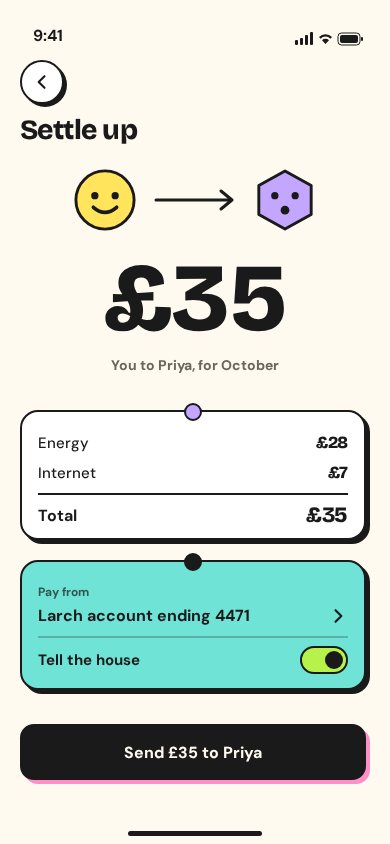
A form screen from Roost, a lifestyle app template in a Gen Z style. Screen 13 of 25.
Roost is roost runs a shared house end to end: a chore rota on a segmented wheel, a shared shopping list with struck through items, bills split into bars per housemate and a settle up flow. It also covers a row of doors showing who is home, a noticeboard of notes, house rules, housemate profiles, notifications and a Roost Plus plan.
| Detail | Value |
|---|---|
| Screen type | Form |
| App | Roost: Your shared house, stuck to the fridge door |
| Category | Lifestyle |
| Design language | Gen Z, light |
| Type | DM Sans |
| Colours | #fffaf0 background, #ffffff surface, #1a1a1a text, #6b655a text-muted, #ffe45c accent, #1a1a1a accent-contrast, #ff8fc7 secondary, #1a1a1a border, #ff5a4d danger |
What this screen says
- Settle up
- You to Priya, for October
- Energy £28
- Internet £7
- Total £35
- Pay from
- Larch account ending 4471
- Tell the house
- Send £35 to Priya
Around it in Roost
More form and input screens
- Forecourt Finance: Buy and sell used cars
- Tower Top up: Mobile plan, data and bills
- Haul Return item: Bargain fashion and finds
- Muse Prompt: AI image studio
- Admit Transfer: Events and tickets near you
- Arcade Install: Game store, library and friends
- Natal New entry: Birth charts and daily astrology
- Sillage Log wear: Fragrance wardrobe
- Hamper Add item: Wishlists and gift registry
- Fade Cut notes: Barber booking
- Inked Custom request: Tattoo artists and bookings
- Scrapbook Write a note: Digital scrapbook journal
Every lifestyle app form screen
What makes a good form screen
- Ask only what you need. Every field is a reason to stop. Remove optional fields or move them to later.
- Labels above fields. Visible labels stay readable while people type; placeholder-only labels disappear.
- Use the right keyboard and input. Number pads for amounts, email keyboards for email, pickers for dates and autofill for addresses and codes.
- Validate as people go. Show problems next to the field when people leave it, in words that say how to fix them.
The full form screen guide and every example
Remix Roost free: describe your own app and it is drawn in this design. Or get its files from $10: Figma, React Native, SwiftUI, Flutter and HTML.