Templates · Dashboard and stats screens · Lifestyle app · Flatpack
Flatpack Rewards screen
A dashboard screen from Flatpack, a furniture store with room previews app template in a Minimal style. Screen 21 of 25.
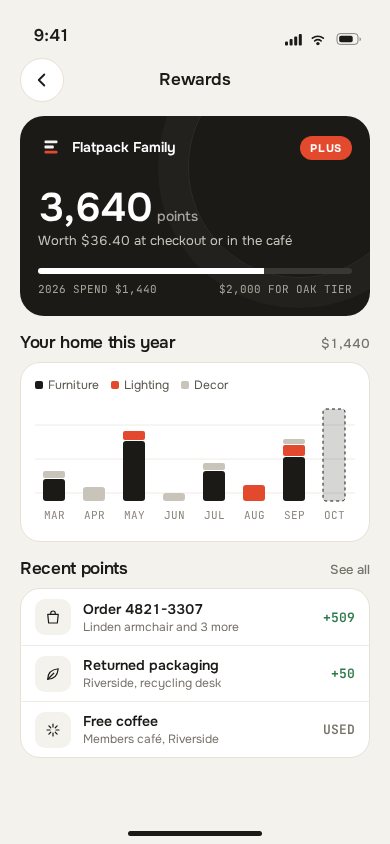
Flatpack is a complete furniture store app: welcome, home store and sign in, a home feed of rooms, a shoppable room with hotspots, search, results with filters, a product page with colours, a measured drawing, a camera room preview, in-store stock with aisle and bin, a store map with a walking route, a shopping list sorted by aisle, cart, delivery slots, assembly booking, payment, confirmation, live delivery tracking, a room planner, rewards, a membership plan, notifications, profile and settings. Warm paper and white with graphite ink and a tomato red for measurements.
| Detail | Value |
|---|---|
| Screen type | Dashboard |
| App | Flatpack: Furniture store with room previews |
| Category | Lifestyle |
| Design language | Minimal, light |
| Type | JetBrains Mono for headings, Onest for text |
| Colours | #f4f2ed background, #ffffff surface, #ebe7df surface-alt, #1b1a17 text, #77736a text-muted, #e2492d accent, #2f7a4b success, #b7791f warning, #e6e2d9 border |
What this screen says
- Rewards
- Flatpack Family
- PLUS
- 3,640points
- Worth $36.40 at checkout or in the café
- 2026 SPEND $1,440 $2,000 FOR OAK TIER
- Your home this year$1,440
- Furniture Lighting Decor
- Recent pointsSee all
- Order 4821-3307
- Linden armchair and 3 more
- Returned packaging
- Riverside, recycling desk
- Free coffee
- Members café, Riverside
- USED
Around it in Flatpack
More dashboard and stats screens
- Tower Usage: Mobile plan, data and bills
- Haul Rewards: Bargain fashion and finds
- Muse Usage: AI image studio
- Admit Host dashboard: Events and tickets near you
- Arcade Achievements: Game store, library and friends
- Natal Patterns: Birth charts and daily astrology
- Sillage Insights: Fragrance wardrobe
- Hamper Gift stats: Wishlists and gift registry
- Fade Cut log: Barber booking
- Inked My ink: Tattoo artists and bookings
- Scrapbook Recap: Digital scrapbook journal
- Rinse Stats: Laundry pickup and delivery
Every lifestyle app dashboard screen
What makes a good dashboard screen
- One headline number. The figure that matters most, like balance, steps or revenue, large at the top with its change since the last period.
- Give numbers context. Compared with last week, against a goal or as a trend line. A number alone does not say if it is good.
- Pick simple charts. Bars for comparing periods, lines for trends and rings for progress toward a goal. Avoid charts that need a legend to read.
- Let people change the period. Day, week, month and year as a segmented control above the chart.
The full dashboard screen guide and every example
Remix Flatpack free: describe your own app and it is drawn in this design. Or get its files from $10: Figma, React Native, SwiftUI, Flutter and HTML.