Templates · Detail screens · Travel app · Roadster
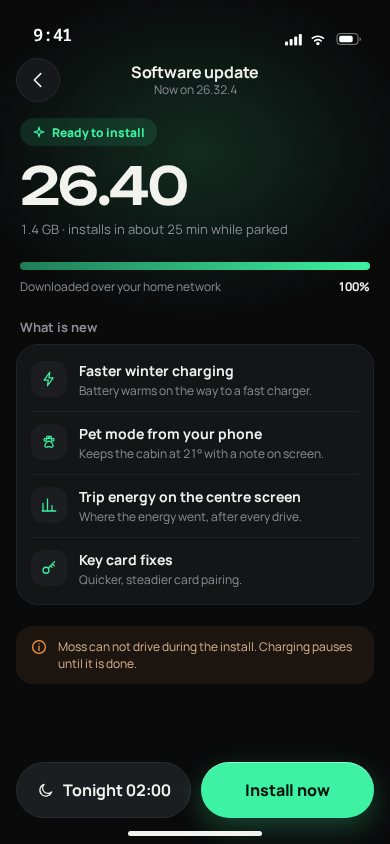
Roadster Software update screen
A detail screen from Roadster, a travel app template in a Dark-first style. Screen 21 of 25.
Roadster is a complete app for owning an electric car: welcome, sign in, phone key setup, a car home with range, lock and quick controls, controls with trunks, lights and tyre pressures, climate with a temperature arc and seat heaters, a live charging session, a charge schedule with off-peak prices, nearby fast chargers, the car on a map, moving it with the front camera, trips and a trip with its consumption, monthly energy, service with booking, a slot and a confirmation, phone keys and sharing a key, a software update, a Plus plan, alerts, account and settings. Asphalt black with charge green and heat amber.
| Detail | Value |
|---|---|
| Screen type | Detail |
| App | Roadster: Your electric car, from your phone |
| Category | Travel |
| Design language | Dark-first, dark |
| Type | Unbounded for headings, Manrope for text |
| Colours | #0a0a0b background, #141517 surface, #f2f2ef text, #8c8e94 text-muted, #3df2a3 accent, #03140c accent-contrast, #ff9a3d secondary, #232428 border, #ff5a52 danger |
What this screen says
- Software update
- Now on 26.32.4
- Ready to install
- 1.4 GB · installs in about 25 min while parked
- Downloaded over your home network 100%
- What is new
- Faster winter charging
- Battery warms on the way to a fast charger.
- Pet mode from your phone
- Keeps the cabin at 21° with a note on screen.
- Trip energy on the centre screen
- Where the energy went, after every drive.
- Key card fixes
- Quicker, steadier card pairing.
- Moss can not drive during the install. Charging pauses until it is done.
- Tonight 02:00
- Install now
Around it in Roadster
More detail screens
- Staya Listing: Homes and stays from local hosts
- Lodge Hotel: Hotels, deals and reservations
- Fare Flight: Flight search and price alerts
- Rove Attraction: Reviews and things to do
- Ignition Car: Car rental from local hosts
- Contrail Fares: Airline booking, check-in and boarding
- Keycard Hotel: Hotel stays, digital key and room service
- Detour Station: Community driving navigation
- Convoy Ride: Carpooling between cities
- Manifest Itinerary: Trip plans from your confirmation emails
- Fairground Ride: Theme park tickets, wait times and map
- Scooter: E-scooter and e-bike rental
Every travel app detail screen
What makes a good detail screen
- Lead with what identifies the item. A large image or title, the price or status, and the key facts at the top. People should know they are in the right place at a glance.
- Keep the main action visible. A sticky bottom button for Add to cart, Book or Play stays reachable while people scroll through details.
- Order information by importance. The facts that decide the choice come first; reviews, specifications and fine print further down.
- Use progressive disclosure. Long descriptions, specifications and policies can expand on tap rather than filling the screen.
The full detail screen guide and every example
Remix Roadster free: describe your own app and it is drawn in this design. Or get its files from $10: Figma, React Native, SwiftUI, Flutter and HTML.