Templates · Live tracking screens · Travel app · Roadster
Roadster Charging screen
A tracking screen from Roadster, a travel app template in a Dark-first style. Screen 7 of 25.
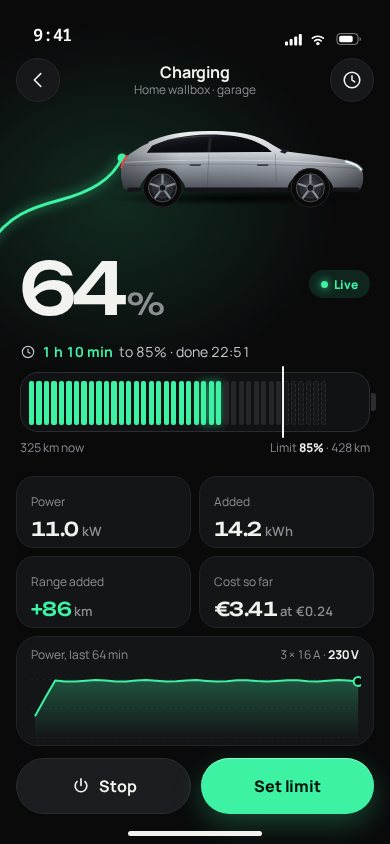
Roadster is a complete app for owning an electric car: welcome, sign in, phone key setup, a car home with range, lock and quick controls, controls with trunks, lights and tyre pressures, climate with a temperature arc and seat heaters, a live charging session, a charge schedule with off-peak prices, nearby fast chargers, the car on a map, moving it with the front camera, trips and a trip with its consumption, monthly energy, service with booking, a slot and a confirmation, phone keys and sharing a key, a software update, a Plus plan, alerts, account and settings. Asphalt black with charge green and heat amber.
| Detail | Value |
|---|---|
| Screen type | Tracking |
| App | Roadster: Your electric car, from your phone |
| Category | Travel |
| Design language | Dark-first, dark |
| Type | Unbounded for headings, Manrope for text |
| Colours | #0a0a0b background, #141517 surface, #f2f2ef text, #8c8e94 text-muted, #3df2a3 accent, #03140c accent-contrast, #ff9a3d secondary, #232428 border, #ff5a52 danger |
What this screen says
- Charging
- Home wallbox · garage
- 1 h 10 min to 85% · done 22:51
- Live
- 325 km now Limit 85% · 428 km
- Power
- 11.0kW
- Added
- 14.2kWh
- Range added
- +86km
- Cost so far
- €3.41at €0.24
- Power, last 64 min 3 × 16 A · 230 V
- Stop
- Set limit
Around it in Roadster
More live tracking screens
- Backroad Drive: Road trip planner with stops
- Bunk On the way: Hostels and backpacker meetups
- Piazza Walking: Self-guided city walking tours
- Fjord Live voyage: Cruise companion on board
- Atlas Navigation: Maps and navigation
- Aloft Live flight: Flight tracker
- Hail Finding a driver: Ride hailing
- Volta Charging: EV charging
- Museo Find a gallery: Museum guide
- Jaunt Route: Bus, train and flight booking
- Spoke Ride: Bike sharing
- Wheelhouse Online: Driver app for ride hailing
Every travel app tracking screen
What makes a good live tracking screen
- The live number is the hero. Arrival time, pace, distance or time left, in large type at the top or centre.
- Show status in words. "Driver is 3 minutes away" or "Halfway there" alongside the map or chart.
- Make it readable while moving. Large numbers, high contrast and big buttons for pause, stop or call.
- Keep updates calm. Smooth movement on the map and steady numbers; jumpy updates feel broken.
The full live tracking screen guide and every example
Remix Roadster free: describe your own app and it is drawn in this design. Or get its files from $10: Figma, React Native, SwiftUI, Flutter and HTML.