Templates · Live tracking screens · Travel app · Backroad
Backroad Drive screen
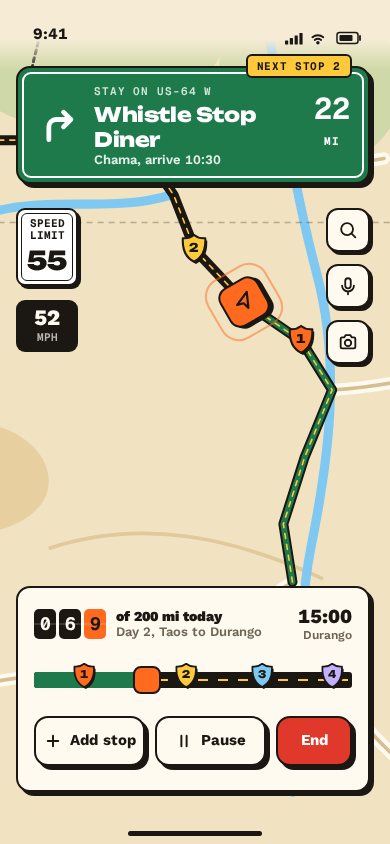
A tracking screen from Backroad, a road trip planner with stops app template in a Neubrutalism style. Screen 18 of 25.
Backroad is a complete road trip planner: welcome, travel style, sign in, a home with tomorrow's drive, trips, a trip map, a day by day itinerary on a road ribbon, stops along the route, search, a stop, adding a stop and a new trip, the shared budget, road stats, booking a motel with review and a confirmation key tag, live drive mode, a postcard maker, the crew, a packing list, notifications, Backroad Plus, profile and settings. Sand and cream with ink outlines, cone orange, highway green and a dashed yellow centre line.
| Detail | Value |
|---|---|
| Screen type | Tracking |
| App | Backroad: Road trip planner with stops |
| Category | Travel |
| Design language | Neubrutalism, light |
| Type | Unbounded for headings, Work Sans for text |
| Colours | #f6ecd6 background, #fffaf0 surface, #1b1814 text, #6f6556 text-muted, #ff6a1f accent, #1b1814 accent-contrast, #1e7a4a secondary, #1b1814 border, #e0392b danger |
What this screen says
- NEXT STOP 2
- Stay on US-64 W Whistle Stop Diner
- Chama, arrive 10:30
- 22MI
- SPEED
- LIMIT55
- 52MPH
- of 200 mi todayDay 2, Taos to Durango
- 15:00Durango
- Add stop
- Pause
- End
Around it in Backroad
More live tracking screens
- Staya Arrival: Homes and stays from local hosts
- Lodge Getting there: Hotels, deals and reservations
- Fare Flight status: Flight search and price alerts
- Ignition Digital key: Car rental from local hosts
- Contrail Flight status: Airline booking, check-in and boarding
- Keycard Order status: Hotel stays, digital key and room service
- Detour Drive: Community driving navigation
- Convoy Live trip: Carpooling between cities
- Manifest Live flight: Trip plans from your confirmation emails
- Roadster Charging: Your electric car, from your phone
- Fairground Map: Theme park tickets, wait times and map
- Scoot Ride: E-scooter and e-bike rental
Every travel app tracking screen
What makes a good live tracking screen
- The live number is the hero. Arrival time, pace, distance or time left, in large type at the top or centre.
- Show status in words. "Driver is 3 minutes away" or "Halfway there" alongside the map or chart.
- Make it readable while moving. Large numbers, high contrast and big buttons for pause, stop or call.
- Keep updates calm. Smooth movement on the map and steady numbers; jumpy updates feel broken.
The full live tracking screen guide and every example
Remix Backroad free: describe your own app and it is drawn in this design. Or get its files from $10: Figma, React Native, SwiftUI, Flutter and HTML.