Templates · Player, camera and editor screens · Social app · Ripple
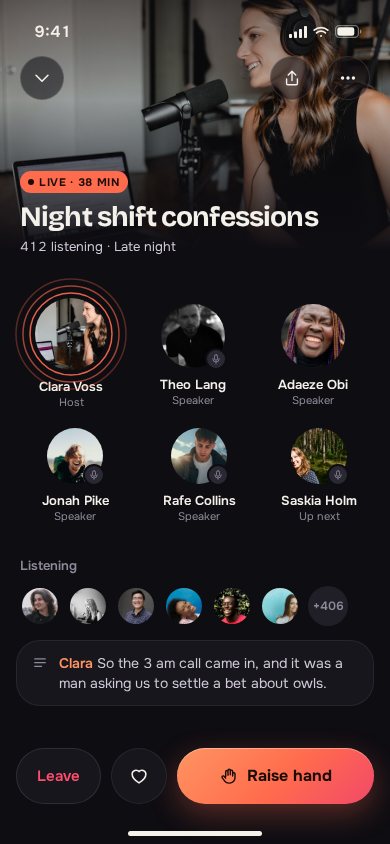
Ripple Live room screen
A media screen from Ripple, a voice notes social app template in a Dark-first style. Screen 16 of 25.
Ripple is a complete voice notes social app: welcome, topics, sign in and a code, a feed of voice notes with unheard rings, a note with a live transcript, a radial now playing screen, threaded voice replies, recording, trimming with voice tones, posting with an audience and a success screen. Also explore with moods, search inside transcripts, live rooms, voice DMs, reach stats, activity, your profile, a creator page, tipping, Ripple Plus and settings. Ink black with a coral glow and sea glass.
| Detail | Value |
|---|---|
| Screen type | Media |
| App | Ripple: Voice notes social |
| Category | Social |
| Design language | Dark-first, dark |
| Type | Bricolage Grotesque for headings, Onest for text |
| Colours | #0e0d12 background, #17161d surface, #f4f0ea text, #8f8a99 text-muted, #ff6b4d accent, #1a0c08 accent-contrast, #8be3cf secondary, #2a2833 border, #ff4d6d danger |
What this screen says
- Live · 38 min
- Night shift confessions
- 412 listening · Late night
- Clara VossHost
- Theo LangSpeaker
- Adaeze ObiSpeaker
- Jonah PikeSpeaker
- Rafe CollinsSpeaker
- Saskia HolmUp next
- Listening
- Clara So the 3 am call came in, and it was a man asking us to settle a bet about owls.
- Leave
- Raise hand
Around it in Ripple
More player, camera and editor screens
- Wink Intro video: Video first dating
- Snoot Story: Social app for pets
- Huddle Voice note: Interest groups and meetups
- Glade Story: Photo and clip social network
- Onair Live room: Live streaming
- Drift Reel: Reels and voice rooms
- Glitz Party room: Party live streaming
- Hearth Video call: Messenger for trips and circles
- Chirp Photo: Messenger with file sharing
- Banter Disappearing photo: Live messenger
- Natter Story: Minimal messenger
- Quorum Photo: Questions and expert answers
What makes a good media player screen
- Content takes the space. Artwork, video or the camera view should fill most of the screen.
- Primary controls in the thumb zone. Play and pause, the shutter or the main tool, large and low on the screen.
- Show progress and position. A scrubber with elapsed and remaining time, or the step in a lesson.
- Hide secondary controls until needed. Lyrics, queue, filters and advanced tools can live behind a tap or a swipe.
The full media player screen guide and every example
Remix Ripple free: describe your own app and it is drawn in this design. Or get its files from $10: Figma, React Native, SwiftUI, Flutter and HTML.