Templates · List and feed screens · Social app · Ripple
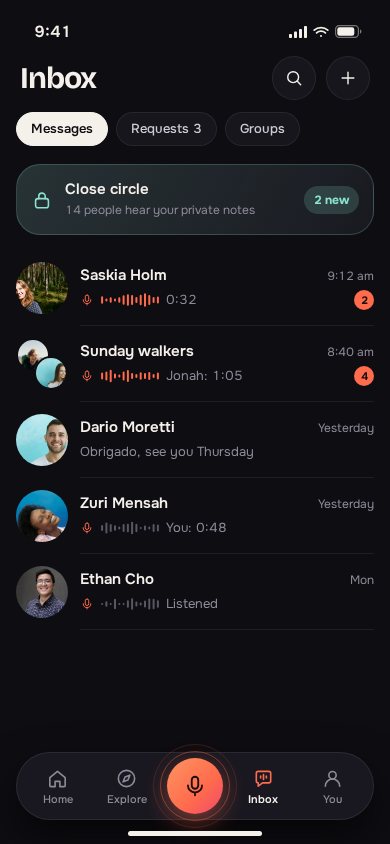
Ripple Inbox screen
A list screen from Ripple, a voice notes social app template in a Dark-first style. Screen 17 of 25.
Ripple is a complete voice notes social app: welcome, topics, sign in and a code, a feed of voice notes with unheard rings, a note with a live transcript, a radial now playing screen, threaded voice replies, recording, trimming with voice tones, posting with an audience and a success screen. Also explore with moods, search inside transcripts, live rooms, voice DMs, reach stats, activity, your profile, a creator page, tipping, Ripple Plus and settings. Ink black with a coral glow and sea glass.
| Detail | Value |
|---|---|
| Screen type | List |
| App | Ripple: Voice notes social |
| Category | Social |
| Design language | Dark-first, dark |
| Type | Bricolage Grotesque for headings, Onest for text |
| Colours | #0e0d12 background, #17161d surface, #f4f0ea text, #8f8a99 text-muted, #ff6b4d accent, #1a0c08 accent-contrast, #8be3cf secondary, #2a2833 border, #ff4d6d danger |
What this screen says
- Inbox
- Messages Requests 3 Groups
- Close circle14 people hear your private notes
- 2 new
- Saskia Holm9:12 am
- Sunday walkers8:40 am
- Jonah: 1:05 4
- Dario MorettiYesterday
- Obrigado, see you Thursday
- Zuri MensahYesterday
- You: 0:48
- Ethan ChoMon
- Listened
- Home
- Explore
- You
Around it in Ripple
More list and feed screens
- Glade Comments: Photo and clip social network
- Onair Notifications: Live streaming
- Drift Comments: Reels and voice rooms
- Glitz Live now: Party live streaming
- Hearth Shared album: Messenger for trips and circles
- Chirp Chat actions: Messenger with file sharing
- Banter New chat: Live messenger
- Natter Start new: Minimal messenger
- Nearly Crossed paths: Dating by crossed paths
- Linkup Skills: Professional network and jobs
- Quorum Comments: Questions and expert answers
- Backer Community: Support creators with memberships
What makes a good list screen
- Show what people need to decide. Each row should carry just enough to choose: a title, one or two details and a status. Everything else belongs on the detail screen.
- Keep rows consistent. The same information in the same place on every row lets people scan down a column instead of reading each item.
- Group with headings. Dates, categories or status headings break long lists into chunks people can skip through.
- Make common actions quick. Swipe actions, a checkbox or a heart on the row save opening the item for small tasks.
The full list screen guide and every example
Remix Ripple free: describe your own app and it is drawn in this design. Or get its files from $10: Figma, React Native, SwiftUI, Flutter and HTML.