Templates · Detail screens · Lifestyle app · Rinse
Rinse Care guide screen
A detail screen from Rinse, a laundry pickup and delivery app template in a Glass style. Screen 19 of 25.
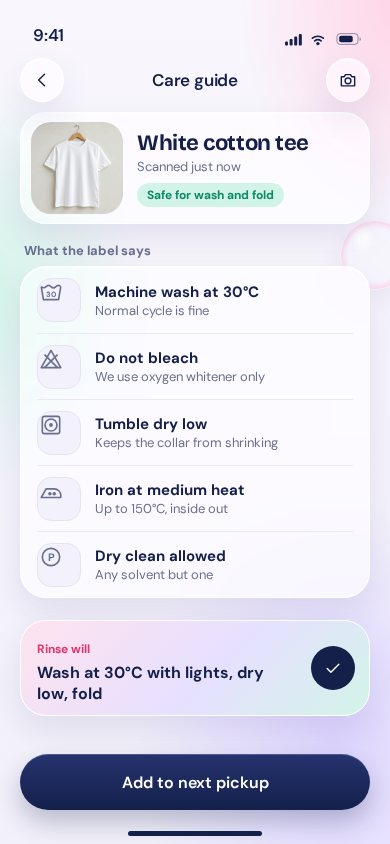
Rinse is a complete laundry pickup and delivery app: welcome and how it works, sign in with a code, a home with the live order in a porthole, services, wash and fold, wash preferences, a pickup slot picker, address, order review and a booked screen, a live driver map, an in the wash tracker, a delivered proof photo, orders and an itemised order, a care label scanner with a care guide, laundry stats, a Rinse Plus plan, wallet, notifications, profile and settings. Pearl white with pink, mint and lilac bubbles, frosted glass and deep navy.
| Detail | Value |
|---|---|
| Screen type | Detail |
| App | Rinse: Laundry pickup and delivery |
| Category | Lifestyle |
| Design language | Glass, light |
| Type | Bricolage Grotesque for headings, DM Sans for text |
| Colours | #f6f4fb background, #ffffff surface, #14204a text, #6a6f8e text-muted, #ff4f8b accent, #ffffff accent-contrast, #14b087 secondary, #e6e3f2 border, #ef4b4b danger |
What this screen says
- Care guide
- White cotton tee
- Scanned just now Safe for wash and fold
- What the label says
- Machine wash at 30°C
- Normal cycle is fine
- Do not bleach
- We use oxygen whitener only
- Tumble dry low
- Keeps the collar from shrinking
- Iron at medium heat
- Up to 150°C, inside out
- Dry clean allowed
- Any solvent but one
- Rinse will
- Wash at 30°C with lights, dry low, fold
- Add to next pickup
Around it in Rinse
More detail screens
- Brief Full story: News in sixty words
- Kibble Product: Pet supplies and autoship
- Filmlog Film: Film diary and reviews
- Guardrail Child: Parental controls and screen time
- Collar Escape alert: GPS pet tracker
- Postage Item: Send parcels and find drop-off points
- Specs Frame: Glasses with virtual try-on
- Circuit Product: Electronics store with trade-in and repairs
- Provenance Item: Authenticated luxury resale
- Gavel Lot: Live online auctions
- Tidy Deep clean: Book home cleaners
- Dorm Property: Find student housing
Every lifestyle app detail screen
What makes a good detail screen
- Lead with what identifies the item. A large image or title, the price or status, and the key facts at the top. People should know they are in the right place at a glance.
- Keep the main action visible. A sticky bottom button for Add to cart, Book or Play stays reachable while people scroll through details.
- Order information by importance. The facts that decide the choice come first; reviews, specifications and fine print further down.
- Use progressive disclosure. Long descriptions, specifications and policies can expand on tap rather than filling the screen.
The full detail screen guide and every example
Remix Rinse free: describe your own app and it is drawn in this design. Or get its files from $10: Figma, React Native, SwiftUI, Flutter and HTML.