Templates · Settings screens · Music app · Riff
Riff Settings screen
A settings screen from Riff, an upload and discover new tracks app template in a Dark-first style. Screen 25 of 25.
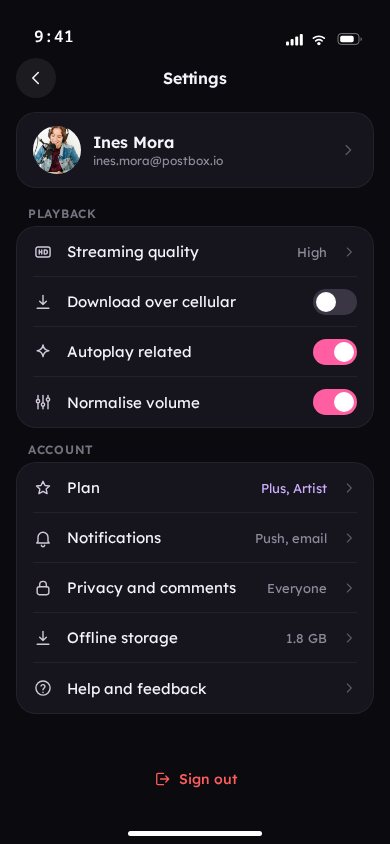
Riff is a complete upload and discovery app for independent music: welcome, genre picks and sign up, a home of fresh and trending tracks, a stream of uploads and reposts from people you follow, a track page and full player with timed comments on the waveform, comments, search and results, an artist page, a playlist, library, likes and up next, a three step upload with details and a published screen, artist insights, activity, a Plus plan with checkout and confirmation, a profile and settings. Violet black with hot pink, violet and ice blue.
| Detail | Value |
|---|---|
| Screen type | Settings |
| App | Riff: Upload and discover new tracks |
| Category | Music |
| Design language | Dark-first, dark |
| Type | Lexend |
| Colours | #0b0a0f background, #16141c surface, #f6f3fa text, #8f8a9b text-muted, #ff5fa2 accent, #1a0711 accent-contrast, #b47cff secondary, #26232e border, #ff5d5d danger |
What this screen says
- Settings
- Ines Mora
- ines.mora@postbox.io
- PLAYBACK
- Streaming quality High
- Download over cellular
- Autoplay related
- Normalise volume
- ACCOUNT
- Plan Plus, Artist
- Notifications Push, email
- Privacy and comments Everyone
- Offline storage 1.8 GB
- Help and feedback
- Sign out
Around it in Riff
More settings screens
- Earshot Settings: Podcast player
- Strum Settings: Learn guitar, one chord at a time
- Gigly Settings: Gig and festival tickets
- Padd Settings: Beat maker
- Aria Settings: Audiobook library
- Hum Settings: Song recognition
- Groove Settings: Vinyl collection and crate digging
- Crossfade Settings: DJ mixing on the go
- Fork Settings: Tuner and metronome
- Belt Settings: Karaoke nights
- Crowd Settings: Concert diary and setlists
- Dial Settings: Internet radio from everywhere
Every music app settings screen
What makes a good settings screen
- Group options into clear sections. Account, notifications, privacy, appearance and help, with headings, so people scan to the right group.
- Label settings by their effect. "Daily reminder at 8:00" is clearer than "Reminders". Add a short description under options that need one.
- Use the right control. Toggles for on and off, a row that opens a list for choices, and sliders only for ranges.
- Apply changes immediately. Most mobile settings take effect when changed, with no Save button to forget.
The full settings screen guide and every example
Remix Riff free: describe your own app and it is drawn in this design. Or get its files from $10: Figma, React Native, SwiftUI, Flutter and HTML.