Templates · Settings screens · Music app · Belt
Belt Settings screen
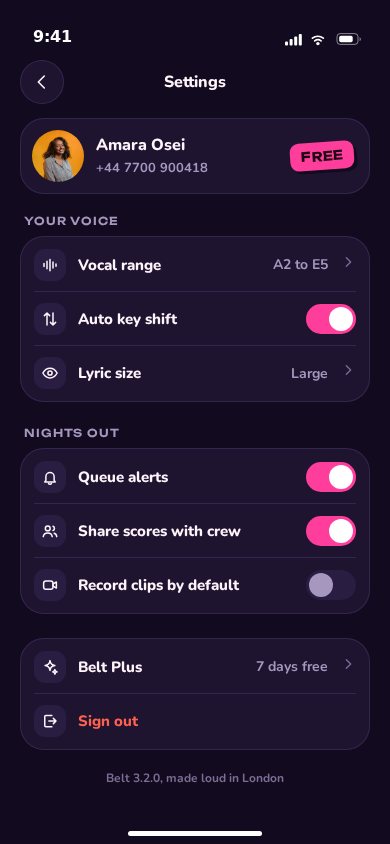
A settings screen from Belt, a karaoke nights app template in a Gen Z style. Screen 25 of 25.
Belt is a complete karaoke nights app: welcome, your voice and sign in, a home with tonight's nights and the queue, a song library with search, song pages with key and difficulty, nights and venue pages, booking a private room with a split checkout and a booked pass, the live queue, requesting a song with a key shift and a duet partner, a now singing screen with wiping lyrics and a pitch ribbon, your score, clips and a clip player, setlists, your crew, a leaderboard, vocal stats, notifications, Belt Plus, profile and settings. Grape black, bubblegum pink and acid lime.
| Detail | Value |
|---|---|
| Screen type | Settings |
| App | Belt: Karaoke nights |
| Category | Music |
| Design language | Gen Z, dark |
| Type | Unbounded for headings, Nunito for text |
| Colours | #120a1f background, #1e1430 surface, #fff4fa text, #a597bd text-muted, #ff3d9a accent, #1c0614 accent-contrast, #d7ff3a secondary, #33264d border, #ff6150 danger |
What this screen says
- Settings
- Amara Osei+44 7700 900418
- Free
- Your voice
- Vocal range
- A2 to E5
- Auto key shift
- Lyric size
- Large
- Nights out
- Queue alerts
- Share scores with crew
- Record clips by default
- Belt Plus
- 7 days free
- Sign out
- Belt 3.2.0, made loud in London
Around it in Belt
More settings screens
- Masters Settings: Royalties and streams for artists
- Sonata Settings: Concert hall season and tickets
- Quire Settings: Sheet music and practice
- Wax Equaliser: Music streaming
- Earshot Settings: Podcast player
- Strum Settings: Learn guitar, one chord at a time
- Gigly Settings: Gig and festival tickets
- Padd Settings: Beat maker
- Aria Settings: Audiobook library
- Hum Settings: Song recognition
- Riff Settings: Upload and discover new tracks
- Groove Settings: Vinyl collection and crate digging
Every music app settings screen
What makes a good settings screen
- Group options into clear sections. Account, notifications, privacy, appearance and help, with headings, so people scan to the right group.
- Label settings by their effect. "Daily reminder at 8:00" is clearer than "Reminders". Add a short description under options that need one.
- Use the right control. Toggles for on and off, a row that opens a list for choices, and sliders only for ranges.
- Apply changes immediately. Most mobile settings take effect when changed, with no Save button to forget.
The full settings screen guide and every example
Remix Belt free: describe your own app and it is drawn in this design. Or get its files from $10: Figma, React Native, SwiftUI, Flutter and HTML.