Templates · Settings screens · Music app · Padd
Padd Settings screen
A settings screen from Padd, a beat maker app template in a Neubrutalism style. Screen 25 of 25.
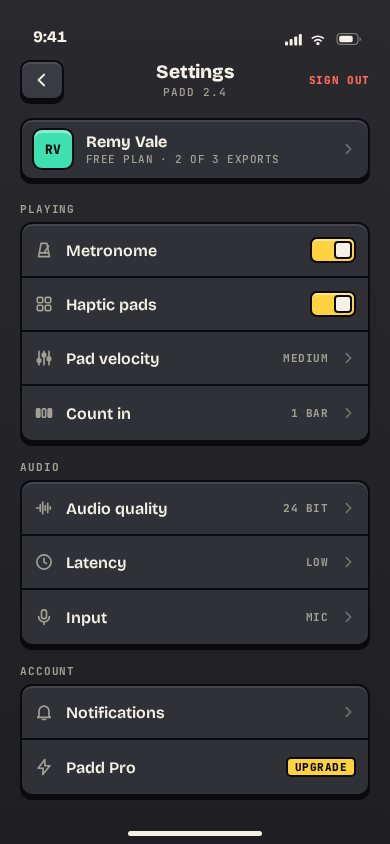
Padd is a complete beat maker: welcome, sign in, a code and a first kit, a home with the beat in progress, projects, a new beat set-up, a sixteen pad grid, a step sequencer, pad editing with knobs, a mixer, effects, sampling from the mic, arranging patterns into a song, sound packs with search, export and share, weekly stats, a Pro plan, notifications, profile and settings. Everything sits on charcoal panels with screws, black outlines and one candy colour per sound.
| Detail | Value |
|---|---|
| Screen type | Settings |
| App | Padd: Beat maker |
| Category | Music |
| Design language | Neubrutalism, dark |
| Type | Bricolage Grotesque |
| Colours | #232327 background, #303037 surface, #f5f1e6 text, #a3a096 text-muted, #ffd23f accent, #0b0b0d accent-contrast, #ff5fa2 secondary, #0b0b0d border, #ff5a4f danger |
What this screen says
- Settings
- Padd 2.4
- Sign out
- RV
- Remy ValeFree plan · 2 of 3 exports
- Playing
- Metronome
- Haptic pads
- Pad velocity
- Medium
- Count in
- 1 bar
- Audio
- Audio quality
- 24 bit
- Latency
- Low
- Input
- Mic
- Account
- Notifications
- Padd Pro
- Upgrade
Around it in Padd
More settings screens
- Hum Settings: Song recognition
- Riff Settings: Upload and discover new tracks
- Groove Settings: Vinyl collection and crate digging
- Crossfade Settings: DJ mixing on the go
- Fork Settings: Tuner and metronome
- Belt Settings: Karaoke nights
- Crowd Settings: Concert diary and setlists
- Dial Settings: Internet radio from everywhere
- Chorus Settings: Singing lessons and pitch training
- Verse Settings: Songwriting notebook
- Masters Settings: Royalties and streams for artists
- Sonata Settings: Concert hall season and tickets
Every music app settings screen
What makes a good settings screen
- Group options into clear sections. Account, notifications, privacy, appearance and help, with headings, so people scan to the right group.
- Label settings by their effect. "Daily reminder at 8:00" is clearer than "Reminders". Add a short description under options that need one.
- Use the right control. Toggles for on and off, a row that opens a list for choices, and sliders only for ranges.
- Apply changes immediately. Most mobile settings take effect when changed, with no Save button to forget.
The full settings screen guide and every example
Remix Padd free: describe your own app and it is drawn in this design. Or get its files from $10: Figma, React Native, SwiftUI, Flutter and HTML.