Templates · List and feed screens · Music app · Riff
Riff Comments screen
A list screen from Riff, an upload and discover new tracks app template in a Dark-first style. Screen 8 of 25.
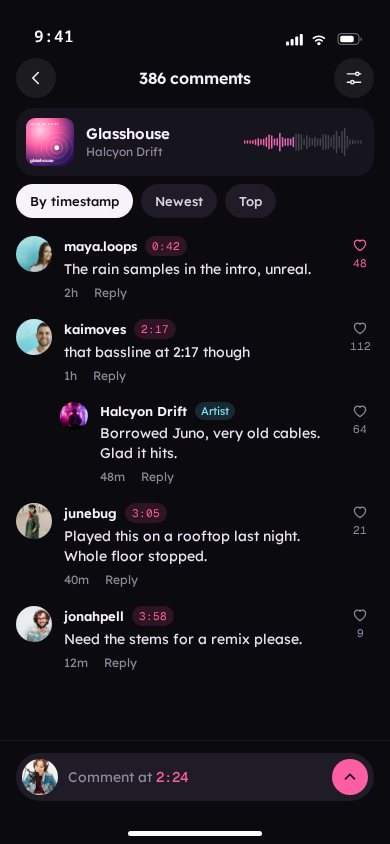
Riff is a complete upload and discovery app for independent music: welcome, genre picks and sign up, a home of fresh and trending tracks, a stream of uploads and reposts from people you follow, a track page and full player with timed comments on the waveform, comments, search and results, an artist page, a playlist, library, likes and up next, a three step upload with details and a published screen, artist insights, activity, a Plus plan with checkout and confirmation, a profile and settings. Violet black with hot pink, violet and ice blue.
| Detail | Value |
|---|---|
| Screen type | List |
| App | Riff: Upload and discover new tracks |
| Category | Music |
| Design language | Dark-first, dark |
| Type | Lexend |
| Colours | #0b0a0f background, #16141c surface, #f6f3fa text, #8f8a9b text-muted, #ff5fa2 accent, #1a0711 accent-contrast, #b47cff secondary, #26232e border, #ff5d5d danger |
What this screen says
- 386 comments
- Glasshouse
- Halcyon Drift
- By timestamp Newest Top
- maya.loops0:42
- The rain samples in the intro, unreal.
- 2h Reply
- kaimoves2:17
- that bassline at 2:17 though
- 1h Reply
- Halcyon DriftArtist
- Borrowed Juno, very old cables. Glad it hits.
- 48m Reply
- junebug3:05
- Played this on a rooftop last night. Whole floor stopped.
- 40m Reply
- jonahpell3:58
- Need the stems for a remix please.
- 12m Reply
- Comment at 2:24
Around it in Riff
More list and feed screens
- Wax Queue: Music streaming
- Earshot Notifications: Podcast player
- Strum Notifications: Learn guitar, one chord at a time
- Gigly Lineup: Gig and festival tickets
- Padd Notifications: Beat maker
- Aria Store: Audiobook library
- Hum Library: Song recognition
- Groove Collection: Vinyl collection and crate digging
- Crossfade Library: DJ mixing on the go
- Fork Presets: Tuner and metronome
- Belt Clips: Karaoke nights
- Crowd Diary: Concert diary and setlists
What makes a good list screen
- Show what people need to decide. Each row should carry just enough to choose: a title, one or two details and a status. Everything else belongs on the detail screen.
- Keep rows consistent. The same information in the same place on every row lets people scan down a column instead of reading each item.
- Group with headings. Dates, categories or status headings break long lists into chunks people can skip through.
- Make common actions quick. Swipe actions, a checkbox or a heart on the row save opening the item for small tasks.
The full list screen guide and every example
Remix Riff free: describe your own app and it is drawn in this design. Or get its files from $10: Figma, React Native, SwiftUI, Flutter and HTML.