Templates · List and feed screens · Music app · Gigly
Gigly Lineup screen
A list screen from Gigly, a gig and festival tickets app template in a Gen Z style. Screen 9 of 25.
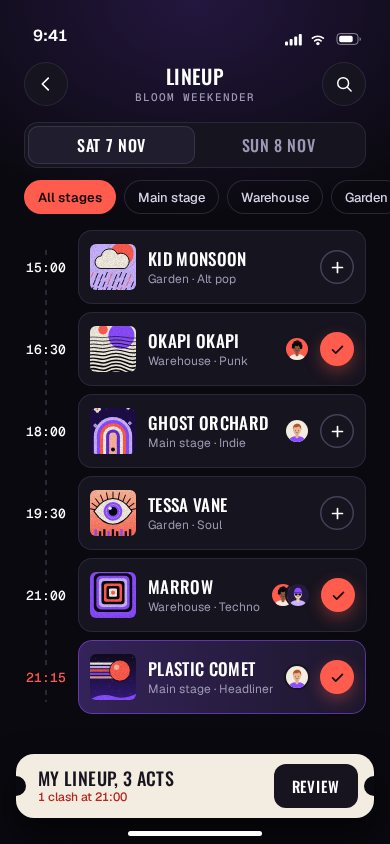
Gigly is a complete ticketing app for live music: welcome, sign in, a code and picking your sound, a home of gigs near you, search and filters, a gig page, a festival lineup with set times, artist and venue pages, a seat map, checkout, payment and a booked screen, a ticket wallet, a paper ticket with a QR code, sending a ticket, the crew of friends going, yearly gig stats, notifications, a Plus plan, profile and settings. Every gig is a drawn poster and every ticket is a notched stub.
| Detail | Value |
|---|---|
| Screen type | List |
| App | Gigly: Gig and festival tickets |
| Category | Music |
| Design language | Gen Z, dark |
| Type | Geist |
| Colours | #0a090f background, #16141f surface, #ffffff text, #9d98b3 text-muted, #ff5c4d accent, #14060a accent-contrast, #8b4dff secondary, #2a2739 border, #ff3d71 danger |
What this screen says
- Lineup
- Bloom Weekender
- Sat 7 Nov Sun 8 Nov
- All stages Main stage Warehouse Garden
- Kid Monsoon
- Garden · Alt pop
- Okapi Okapi
- Warehouse · Punk
- Ghost Orchard
- Main stage · Indie
- Tessa Vane
- Garden · Soul
- Marrow
- Warehouse · Techno
- Plastic Comet
- Main stage · Headliner
- My lineup, 3 acts
- 1 clash at 21:00
- Review
Around it in Gigly
More list and feed screens
- Wax Queue: Music streaming
- Earshot Notifications: Podcast player
- Strum Notifications: Learn guitar, one chord at a time
- Padd Notifications: Beat maker
- Aria Store: Audiobook library
- Hum Library: Song recognition
- Riff Stream: Upload and discover new tracks
- Groove Collection: Vinyl collection and crate digging
- Crossfade Library: DJ mixing on the go
- Fork Presets: Tuner and metronome
- Belt Clips: Karaoke nights
- Crowd Diary: Concert diary and setlists
What makes a good list screen
- Show what people need to decide. Each row should carry just enough to choose: a title, one or two details and a status. Everything else belongs on the detail screen.
- Keep rows consistent. The same information in the same place on every row lets people scan down a column instead of reading each item.
- Group with headings. Dates, categories or status headings break long lists into chunks people can skip through.
- Make common actions quick. Swipe actions, a checkbox or a heart on the row save opening the item for small tasks.
The full list screen guide and every example
Remix Gigly free: describe your own app and it is drawn in this design. Or get its files from $10: Figma, React Native, SwiftUI, Flutter and HTML.