Templates · List and feed screens · Music app · Hum
Hum Library screen
A list screen from Hum, a song recognition app template in a Glass style. Screen 12 of 25.
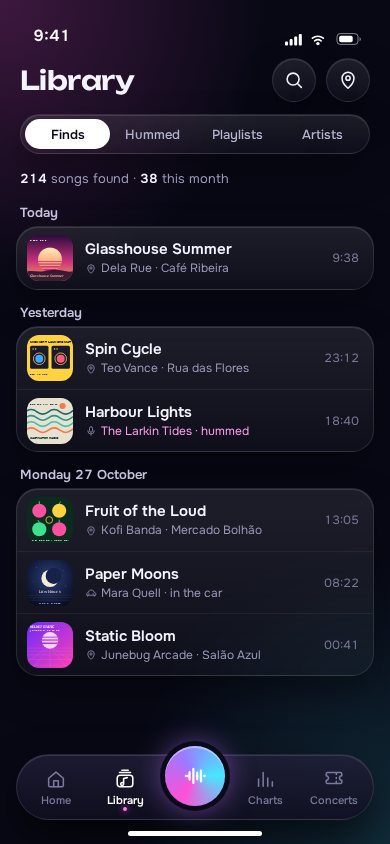
Hum is a complete song recognition app: welcome, microphone access, sign in, a home with the listening orb and recent finds, listening and hum mode, the match with synced lyrics and a preview player, artist and album pages, your library of finds, search, city charts, songs found nearby on a map, your listening stats, concerts with tickets and a booking confirmation, a share card, Hum Plus, notifications, profile and settings. Ink navy glass lit by magenta and aqua.
| Detail | Value |
|---|---|
| Screen type | List |
| App | Hum: Song recognition |
| Category | Music |
| Design language | Glass, dark |
| Type | Unbounded for headings, Onest for text |
| Colours | #070814 background, #15152a surface, #f4f3ff text, #9a98b8 text-muted, #ff4fd8 accent, #ffffff accent-contrast, #48e5ff secondary, #26253f border, #ff5a7a danger |
What this screen says
- Library
- Finds
- Hummed
- Playlists
- Artists
- 214 songs found · 38 this month
- Today
- Glasshouse Summer
- Dela Rue · Café Ribeira
- Yesterday
- Spin Cycle
- Teo Vance · Rua das Flores
- Harbour Lights
- The Larkin Tides · hummed
- Monday 27 October
- Fruit of the Loud
- Kofi Banda · Mercado Bolhão
- Paper Moons
- Mara Quell · in the car
- Static Bloom
- Junebug Arcade · Salão Azul
- Home
- Charts
- Concerts
Around it in Hum
More list and feed screens
- Strum Notifications: Learn guitar, one chord at a time
- Gigly Lineup: Gig and festival tickets
- Padd Notifications: Beat maker
- Aria Store: Audiobook library
- Riff Stream: Upload and discover new tracks
- Groove Collection: Vinyl collection and crate digging
- Crossfade Library: DJ mixing on the go
- Fork Presets: Tuner and metronome
- Belt Clips: Karaoke nights
- Crowd Diary: Concert diary and setlists
- Dial City: Internet radio from everywhere
- Chorus Course: Singing lessons and pitch training
What makes a good list screen
- Show what people need to decide. Each row should carry just enough to choose: a title, one or two details and a status. Everything else belongs on the detail screen.
- Keep rows consistent. The same information in the same place on every row lets people scan down a column instead of reading each item.
- Group with headings. Dates, categories or status headings break long lists into chunks people can skip through.
- Make common actions quick. Swipe actions, a checkbox or a heart on the row save opening the item for small tasks.
The full list screen guide and every example
Remix Hum free: describe your own app and it is drawn in this design. Or get its files from $10: Figma, React Native, SwiftUI, Flutter and HTML.