Templates · List and feed screens · Lifestyle app · Rewear
Rewear Notifications screen
A list screen from Rewear, a secondhand fashion marketplace app template in a Gen Z style. Screen 23 of 25.
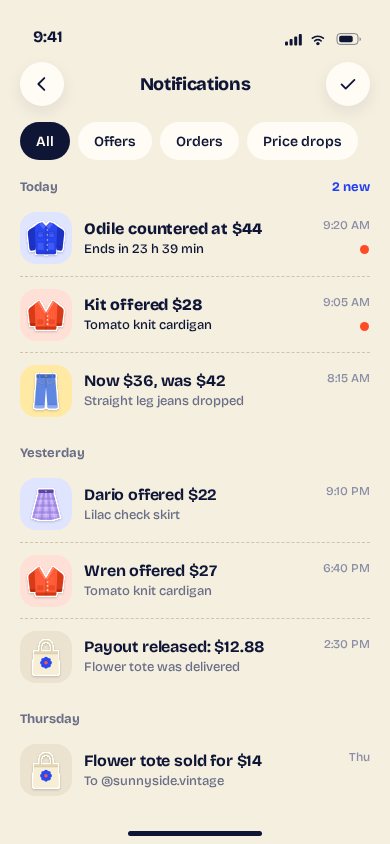
Rewear is a complete resale app: welcome, sign in and a code, a feed of fresh drops, search, an item page, a seller with ratings, making an offer and tracking offers, an inbox and a chat with offer cards, a three step sell flow, a bag, checkout, order tracking, a wardrobe of listings and likes, earnings, a Plus plan, notifications, profile and settings. Every garment is an original flat illustration cut out like a sticker, so nothing depends on stock photos.
| Detail | Value |
|---|---|
| Screen type | List |
| App | Rewear: Secondhand fashion marketplace |
| Category | Lifestyle |
| Design language | Gen Z, light |
| Type | Bricolage Grotesque |
| Colours | #f5efe0 background, #fffcf5 surface, #0f1535 text, #6a6e86 text-muted, #2340f0 accent, #fffcf5 accent-contrast, #ff4a26 secondary, #e4dcc6 border, #d93414 danger |
What this screen says
- Notifications
- All Offers Orders Price drops
- Today2 new
- Odile countered at $44
- Ends in 23 h 39 min
- 9:20 AM
- Kit offered $28
- Tomato knit cardigan
- 9:05 AM
- Now $36, was $42
- Straight leg jeans dropped
- 8:15 AM
- Yesterday
- Dario offered $22
- Lilac check skirt
- 9:10 PM
- Wren offered $27
- 6:40 PM
- Payout released: $12.88
- Flower tote was delivered
- 2:30 PM
- Thursday
- Flower tote sold for $14
- To @sunnyside.vintage
- Thu
Around it in Rewear
More list and feed screens
- Specs Home try-on: Glasses with virtual try-on
- Circuit Deals: Electronics store with trade-in and repairs
- Provenance Results: Authenticated luxury resale
- Gavel Auctions: Live online auctions
- Tidy Choose cleaner: Book home cleaners
- Dorm Saved: Find student housing
- Hem Orders: Tailoring and alterations, collected
- Lendly Party gear: Borrow things from neighbours
- Stub Listings: Fan to fan ticket resale
- Trove Boards: Visual ideas and boards
- Vidi Comments: Video platform for creators
- Roll Albums: Photo library and backups
Every lifestyle app list screen
What makes a good list screen
- Show what people need to decide. Each row should carry just enough to choose: a title, one or two details and a status. Everything else belongs on the detail screen.
- Keep rows consistent. The same information in the same place on every row lets people scan down a column instead of reading each item.
- Group with headings. Dates, categories or status headings break long lists into chunks people can skip through.
- Make common actions quick. Swipe actions, a checkbox or a heart on the row save opening the item for small tasks.
The full list screen guide and every example
Remix Rewear free: describe your own app and it is drawn in this design. Or get its files from $10: Figma, React Native, SwiftUI, Flutter and HTML.