Templates · Form and input screens · Food app · Rescue
Rescue Filters screen
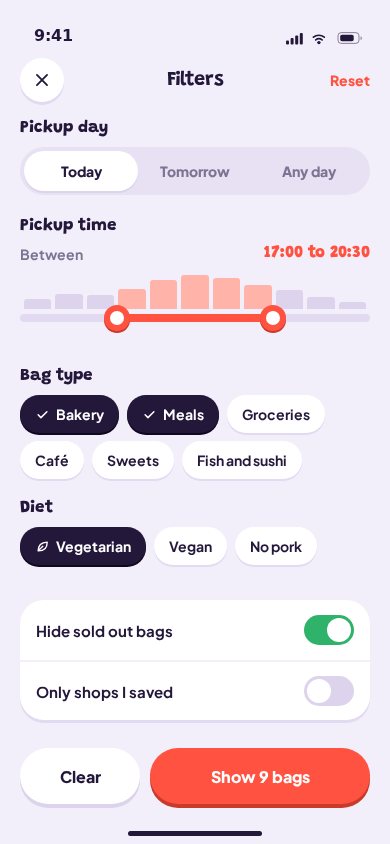
A form screen from Rescue, a surprise bags of surplus food app template in a Playful style. Screen 8 of 25.
Rescue is a complete surplus food app: welcome and how it works, sign in, a pickup area with a radius, a discover home with tonight's bags, a map of price pins, search and filters, a category list, a bag page with pickup window, price against value and what might be inside, a shop page, reserve, payment and a reserved ticket, orders, a live pickup screen with a swipe to collect, a collected moment, rating, an impact dashboard, saved shops, notifications, a membership plan, invites, profile and settings. Lilac and white with tomato red, butter yellow and kraft paper bags.
| Detail | Value |
|---|---|
| Screen type | Form |
| App | Rescue: Surprise bags of surplus food |
| Category | Food |
| Design language | Playful, light |
| Type | Grandstander for headings, Plus Jakarta Sans for text |
| Colours | #f3effa background, #ffffff surface, #23173a text, #7d7393 text-muted, #ff5240 accent, #ffffff accent-contrast, #ffd84d secondary, #e2daf0 border, #2fb36a success, #e0ab6e kraft |
What this screen says
- Filters
- Reset
- Pickup day
- Today Tomorrow Any day
- Pickup time
- Between 17:00 to 20:30
- Bag type
- Bakery Meals Groceries Café Sweets Fish and sushi
- Diet
- Vegetarian Vegan No pork
- Hide sold out bags
- Only shops I saved
- Clear
- Show 9 bags
Around it in Rescue
More form and input screens
- Curbside Write review: Street food and food truck finder
- Forage Swap items: Farmers market and veg box
- Ember Alerts: Smoker and grill thermometer
- Steep Brew setup: Tea brewing and tasting notes
- Brigade New prep task: Restaurant kitchen and line ops
- Nibs Add member: Food allergy and label scanner
- Ladle Add a meal: Recipes and meal planning
- Pantry Delivery address: Grocery delivery
- Brewly Customise: Coffee ordering and loyalty
- Tabla Filters: Tables worth dressing for
- Corked Tasting note: Wine journal and cellar
- Crumb Build a cake: Neighbourhood bakery
What makes a good form screen
- Ask only what you need. Every field is a reason to stop. Remove optional fields or move them to later.
- Labels above fields. Visible labels stay readable while people type; placeholder-only labels disappear.
- Use the right keyboard and input. Number pads for amounts, email keyboards for email, pickers for dates and autofill for addresses and codes.
- Validate as people go. Show problems next to the field when people leave it, in words that say how to fix them.
The full form screen guide and every example
Remix Rescue free: describe your own app and it is drawn in this design. Or get its files from $10: Figma, React Native, SwiftUI, Flutter and HTML.