Templates · Player, camera and editor screens · Productivity app · Replay
Replay Trim screen
A media screen from Replay, a record and share screen videos app template in a Glass style. Screen 10 of 25.
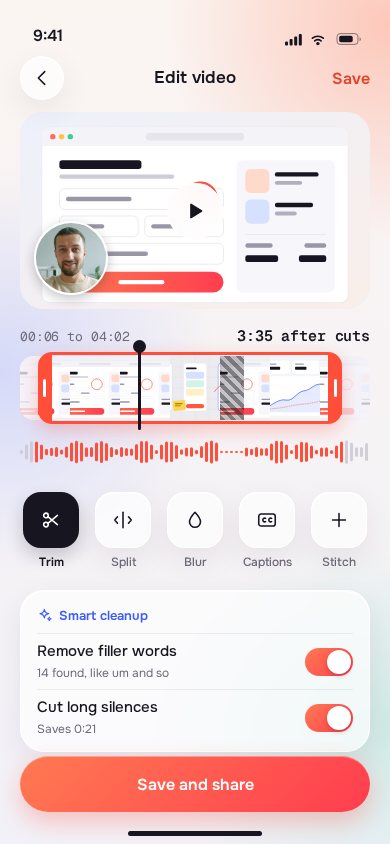
Replay is a complete async video app for teams: welcome, studio permissions and sign in, a home with record modes and recent videos, library, folders and transcript search, a recording setup, a live screen recording with a camera bubble and drawing, trim and smart cleanup, a ready screen with the link copied, the video page with timestamped reactions, transcript, AI summary and chapters, comments, share permissions, viewer insights and viewers, a workspace with spaces and invites, inbox, Pro plan, upgrade, profile and settings. Warm porcelain glass with coral, cobalt and mint.
| Detail | Value |
|---|---|
| Screen type | Media |
| App | Replay: Record and share screen videos |
| Category | Productivity |
| Design language | Glass, light |
| Type | Bricolage Grotesque for headings, Onest for text |
| Colours | #fbf5f2 background, #ffffff surface, #17151f text, #6e6a78 text-muted, #ff4f3b accent, #ffffff accent-contrast, #3b5bff secondary, #ebe7ee border, #14a97c success, #e5402c danger |
What this screen says
- Edit video
- Save
- 00:06 to 04:02 3:35 after cuts
- Trim
- Split
- Blur
- Captions
- Stitch
- Smart cleanup
- Remove filler words
- 14 found, like um and so
- Cut long silences
- Saves 0:21
- Save and share
Around it in Replay
More player, camera and editor screens
- Parchment Editing: Documents, edit and share
- Lectern Editor: Slides and presenter remote
- Ringer Incoming call: Phone, contacts and voicemail
- Pipeline Voice note: Sales CRM on the road
- Aim Weekly brief: Goals and key results
- Scribe Recording: Voice memos to notes
- Inkline Document: Sign and send contracts
- Dispatch Photos: Field service jobs for technicians
- Stash Listen: Read-it-later and highlights
- Branch Canvas: Mind maps
- Stow Photo preview: Cloud storage
- Meridian Reader: Mobile web browser
Every productivity app media screen
What makes a good media player screen
- Content takes the space. Artwork, video or the camera view should fill most of the screen.
- Primary controls in the thumb zone. Play and pause, the shutter or the main tool, large and low on the screen.
- Show progress and position. A scrubber with elapsed and remaining time, or the step in a lesson.
- Hide secondary controls until needed. Lyrics, queue, filters and advanced tools can live behind a tap or a swipe.
The full media player screen guide and every example
Remix Replay free: describe your own app and it is drawn in this design. Or get its files from $10: Figma, React Native, SwiftUI, Flutter and HTML.