Templates · Detail screens · Productivity app · Replay
Replay Summary screen
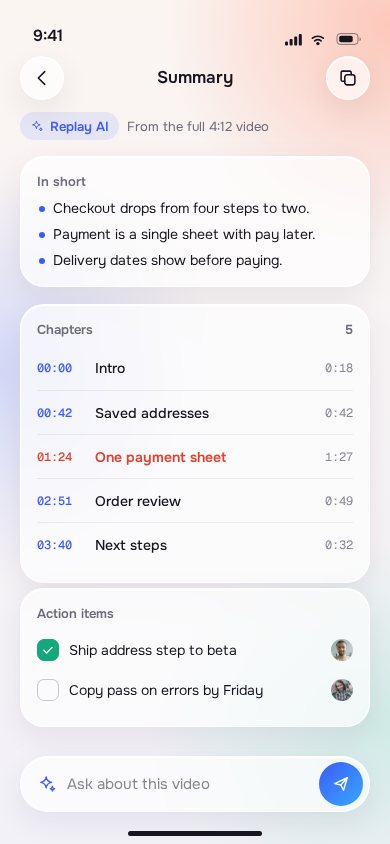
A detail screen from Replay, a record and share screen videos app template in a Glass style. Screen 14 of 25.
Replay is a complete async video app for teams: welcome, studio permissions and sign in, a home with record modes and recent videos, library, folders and transcript search, a recording setup, a live screen recording with a camera bubble and drawing, trim and smart cleanup, a ready screen with the link copied, the video page with timestamped reactions, transcript, AI summary and chapters, comments, share permissions, viewer insights and viewers, a workspace with spaces and invites, inbox, Pro plan, upgrade, profile and settings. Warm porcelain glass with coral, cobalt and mint.
| Detail | Value |
|---|---|
| Screen type | Detail |
| App | Replay: Record and share screen videos |
| Category | Productivity |
| Design language | Glass, light |
| Type | Bricolage Grotesque for headings, Onest for text |
| Colours | #fbf5f2 background, #ffffff surface, #17151f text, #6e6a78 text-muted, #ff4f3b accent, #ffffff accent-contrast, #3b5bff secondary, #ebe7ee border, #14a97c success, #e5402c danger |
What this screen says
- Summary
- Replay AI From the full 4:12 video
- In short
- Checkout drops from four steps to two.
- Payment is a single sheet with pay later.
- Delivery dates show before paying.
- Chapters5
- Intro
- Saved addresses
- One payment sheet
- Order review
- Next steps
- Action items
- Ship address step to beta
- Copy pass on errors by Friday
- Ask about this video
Around it in Replay
More detail screens
- Unplug Blocked: Screen time blocker
- Streak Habit: Small days, long chains
- Deskly Desk: Hybrid office booking
- Pomo Task: Focus timer
- Postbox Thread: Email for busy teams
- Daybook Event: Calendar and planner
- Scanly Document: Document scanner
- Keyring Login: Password manager
- Rota Shift detail: Shift scheduling for hourly teams
- Inkwell Entry: Daily journal
- Shortlist Job: Job search and application tracker
- Parley Chat: Team messenger
Every productivity app detail screen
What makes a good detail screen
- Lead with what identifies the item. A large image or title, the price or status, and the key facts at the top. People should know they are in the right place at a glance.
- Keep the main action visible. A sticky bottom button for Add to cart, Book or Play stays reachable while people scroll through details.
- Order information by importance. The facts that decide the choice come first; reviews, specifications and fine print further down.
- Use progressive disclosure. Long descriptions, specifications and policies can expand on tap rather than filling the screen.
The full detail screen guide and every example
Remix Replay free: describe your own app and it is drawn in this design. Or get its files from $10: Figma, React Native, SwiftUI, Flutter and HTML.