Templates · List and feed screens · Finance app · Recur
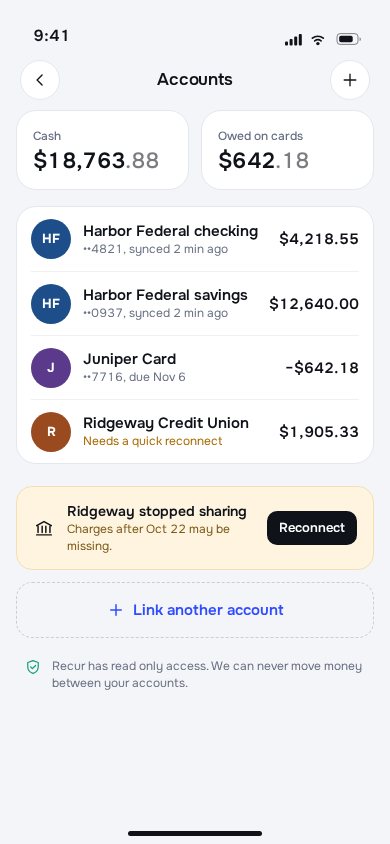
Recur Accounts screen
A list screen from Recur, a track and cancel subscriptions app template in a Minimal style. Screen 21 of 25.
Recur is a complete subscription and bill manager: welcome, linking a bank, sign in and a code, a home with the month's renewal ring, every subscription with its next charge, a subscription page, a three step cancel flow ending in a confirmation, a price increase alert, a bill negotiation request with a live negotiation tracker, a charge calendar, spending, transactions, search, adding a subscription by hand, credit score, savings, linked accounts, notifications, a pay what you want plan, profile and settings. Cool grey and white with ink, cobalt, amber and green.
| Detail | Value |
|---|---|
| Screen type | List |
| App | Recur: Track and cancel subscriptions |
| Category | Finance |
| Design language | Minimal, light |
| Type | Onest |
| Colours | #f4f5f8 background, #ffffff surface, #0f1218 text, #687083 text-muted, #2f4cff accent, #ffffff accent-contrast, #0f9f6e secondary, #e5e7ee border, #e5484d danger |
What this screen says
- Accounts
- Cash $18,763.88
- Owed on cards $642.18
- HF
- Harbor Federal checking
- ••4821, synced 2 min ago
- Harbor Federal savings
- ••0937, synced 2 min ago
- Juniper Card
- ••7716, due Nov 6
- −$642.18
- Ridgeway Credit Union
- Needs a quick reconnect
- Ridgeway stopped sharing
- Charges after Oct 22 may be missing.
- Reconnect
- Link another account
- Recur has read only access. We can never move money between your accounts.
Around it in Recur
More list and feed screens
- Ticker Movers: Stock investing
- Burrow Notifications: Shared savings pots
- Remit Notifications: International money transfer
- Piggy Chores: Pocket money for kids
- Settle Notifications: Bill payments and banking
- Fathom Notifications: Crypto wallet
- Marigold Notifications: Mobile banking
- Zentra Activity: Crypto trading
- Payday Pay runs: Payroll for small teams
- Roundup Round ups: Invest your spare change
- Envelope Quick assign: Give every dollar a job
- Keel Cards: Corporate cards and spend controls
What makes a good list screen
- Show what people need to decide. Each row should carry just enough to choose: a title, one or two details and a status. Everything else belongs on the detail screen.
- Keep rows consistent. The same information in the same place on every row lets people scan down a column instead of reading each item.
- Group with headings. Dates, categories or status headings break long lists into chunks people can skip through.
- Make common actions quick. Swipe actions, a checkbox or a heart on the row save opening the item for small tasks.
The full list screen guide and every example
Remix Recur free: describe your own app and it is drawn in this design. Or get its files from $10: Figma, React Native, SwiftUI, Flutter and HTML.