Templates · Detail screens · Social app · Quorum
Quorum Topic screen
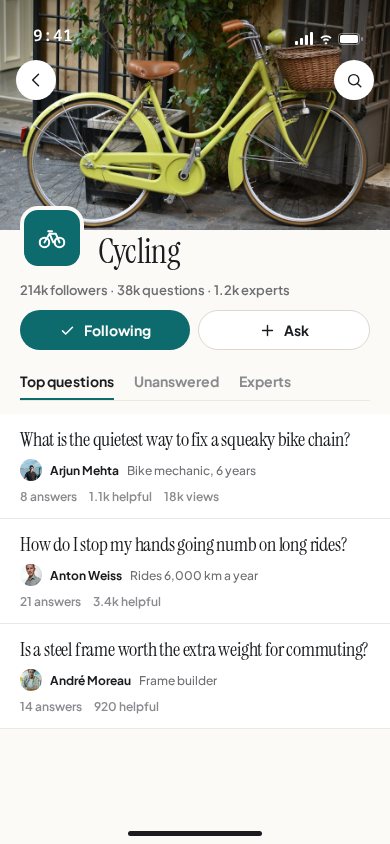
A detail screen from Quorum, a questions and expert answers app template in a Minimal style. Screen 16 of 25.
Quorum is a complete question and answer app: welcome, topic picking and sign in, a home feed of questions with their top answer, a question page with several ranked answers, a full answer with photos and comments, an answer composer, asking a question with topics and answer requests, a posted confirmation, answer requests, search and results, a topic, spaces and a space, notifications, a profile with credentials, editing credentials, answer stats, bookmarks, a Plus plan and settings. Paper white with a serif for questions, petrol teal and honey amber.
| Detail | Value |
|---|---|
| Screen type | Detail |
| App | Quorum: Questions and expert answers |
| Category | Social |
| Design language | Minimal, light |
| Type | Instrument Serif for headings, Plus Jakarta Sans for text |
| Colours | #fbfaf7 background, #ffffff surface, #1a1c1f text, #6e6f73 text-muted, #0d6b6e accent, #ffffff accent-contrast, #e09a33 secondary, #ebe8e1 border, #d14b3a danger |
What this screen says
- Cycling
- 214k followers · 38k questions · 1.2k experts
- Following
- Ask
- Top questions Unanswered Experts
- What is the quietest way to fix a squeaky bike chain?
- Arjun MehtaBike mechanic, 6 years
- 8 answers 1.1k helpful 18k views
- How do I stop my hands going numb on long rides?
- Anton WeissRides 6,000 km a year
- 21 answers 3.4k helpful
- Is a steel frame worth the extra weight for commuting?
- André MoreauFrame builder
- 14 answers 920 helpful
Around it in Quorum
More detail screens
- Flick Sound: Short video feed
- Squawk Post: Short posts and live conversation
- Agora Post: Communities, threads and votes
- Spark Profile: Swipe dating
- Candid Post: One real photo a day
- Blink Chat: Camera chat and stories
- Cipher Chat: Encrypted private messenger
- Commons Post: Friends, groups and events
- Tether Member: Family location and safety
- Facet Contact: Video calls with family and friends
- Stoop Lost cat: Neighbourhood noticeboard
- Aura Friend aura: Moods with close friends
Every social app detail screen
What makes a good detail screen
- Lead with what identifies the item. A large image or title, the price or status, and the key facts at the top. People should know they are in the right place at a glance.
- Keep the main action visible. A sticky bottom button for Add to cart, Book or Play stays reachable while people scroll through details.
- Order information by importance. The facts that decide the choice come first; reviews, specifications and fine print further down.
- Use progressive disclosure. Long descriptions, specifications and policies can expand on tap rather than filling the screen.
The full detail screen guide and every example
Remix Quorum free: describe your own app and it is drawn in this design. Or get its files from $10: Figma, React Native, SwiftUI, Flutter and HTML.