Templates · Detail screens · Social app · Cipher
Cipher Chat screen
A detail screen from Cipher, an encrypted private messenger app template in a Dark-first style. Screen 5 of 25.
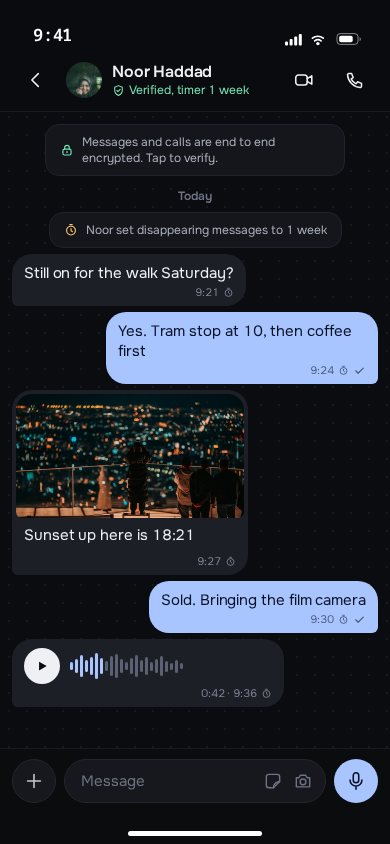
Cipher is a complete private messenger: welcome, phone number and code, a chat list with pinned and sealed chats, a conversation with disappearing messages, safety number verification with a scannable code, contact and group info, a new group, note to self, search, calls with voice and video, stories, linked devices with a pairing scanner, privacy, storage, a supporter plan and settings. Near black and graphite with ice blue bubbles and a mint seal.
| Detail | Value |
|---|---|
| Screen type | Detail |
| App | Cipher: Encrypted private messenger |
| Category | Social |
| Design language | Dark-first, dark |
| Type | Space Grotesk for headings, Onest for text |
| Colours | #0b0c0f background, #15171c surface, #eef0f4 text, #8b91a1 text-muted, #a8c5ff accent, #0a1226 accent-contrast, #74e3b5 secondary, #20232b border, #ff6b6b danger |
What this screen says
- Noor Haddad
- Verified, timer 1 week
- Messages and calls are end to end encrypted. Tap to verify.
- Today
- Noor set disappearing messages to 1 week
- Still on for the walk Saturday?
- Yes. Tram stop at 10, then coffee first
- Sunset up here is 18:21
- Sold. Bringing the film camera
- 0:42 · 9:36
- Message
Around it in Cipher
More detail screens
- Glade Post: Photo and clip social network
- Onair Send a gift: Live streaming
- Drift Group: Reels and voice rooms
- Glitz Chat: Party live streaming
- Hearth Group chat: Messenger for trips and circles
- Chirp Conversation: Messenger with file sharing
- Banter Chat: Live messenger
- Natter Chat: Minimal messenger
- Nearly Person: Dating by crossed paths
- Linkup Post: Professional network and jobs
- Quorum Question: Questions and expert answers
- Backer Tiers: Support creators with memberships
Every social app detail screen
What makes a good detail screen
- Lead with what identifies the item. A large image or title, the price or status, and the key facts at the top. People should know they are in the right place at a glance.
- Keep the main action visible. A sticky bottom button for Add to cart, Book or Play stays reachable while people scroll through details.
- Order information by importance. The facts that decide the choice come first; reviews, specifications and fine print further down.
- Use progressive disclosure. Long descriptions, specifications and policies can expand on tap rather than filling the screen.
The full detail screen guide and every example
Remix Cipher free: describe your own app and it is drawn in this design. Or get its files from $10: Figma, React Native, SwiftUI, Flutter and HTML.