Templates · List and feed screens · Social app · Quorum
Quorum Spaces screen
A list screen from Quorum, a questions and expert answers app template in a Minimal style. Screen 17 of 25.
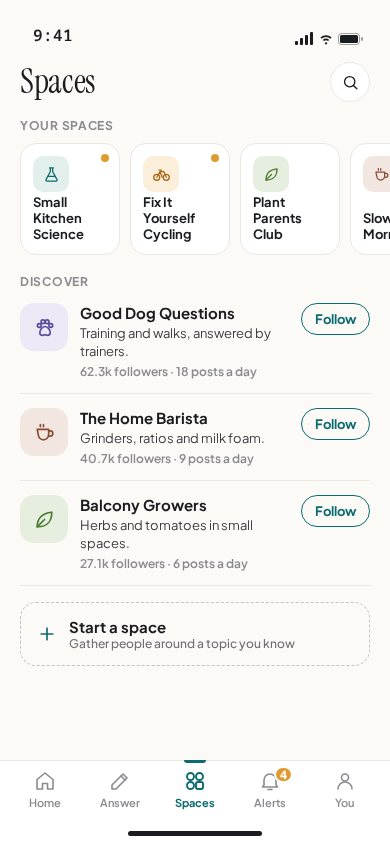
Quorum is a complete question and answer app: welcome, topic picking and sign in, a home feed of questions with their top answer, a question page with several ranked answers, a full answer with photos and comments, an answer composer, asking a question with topics and answer requests, a posted confirmation, answer requests, search and results, a topic, spaces and a space, notifications, a profile with credentials, editing credentials, answer stats, bookmarks, a Plus plan and settings. Paper white with a serif for questions, petrol teal and honey amber.
| Detail | Value |
|---|---|
| Screen type | List |
| App | Quorum: Questions and expert answers |
| Category | Social |
| Design language | Minimal, light |
| Type | Instrument Serif for headings, Plus Jakarta Sans for text |
| Colours | #fbfaf7 background, #ffffff surface, #1a1c1f text, #6e6f73 text-muted, #0d6b6e accent, #ffffff accent-contrast, #e09a33 secondary, #ebe8e1 border, #d14b3a danger |
What this screen says
- Spaces
- Your spaces
- Small Kitchen Science
- Fix It Yourself Cycling
- Plant Parents Club
- Slow Mornings
- Discover
- Good Dog Questions
- Training and walks, answered by trainers.
- 62.3k followers · 18 posts a day
- Follow
- The Home Barista
- Grinders, ratios and milk foam.
- 40.7k followers · 9 posts a day
- Balcony Growers
- Herbs and tomatoes in small spaces.
- 27.1k followers · 6 posts a day
- Start a spaceGather people around a topic you know
- Home
- Answer
- Alerts 4
- You
Around it in Quorum
More list and feed screens
- Onair Notifications: Live streaming
- Drift Comments: Reels and voice rooms
- Glitz Live now: Party live streaming
- Hearth Shared album: Messenger for trips and circles
- Chirp Chat actions: Messenger with file sharing
- Banter New chat: Live messenger
- Natter Start new: Minimal messenger
- Nearly Crossed paths: Dating by crossed paths
- Linkup Skills: Professional network and jobs
- Backer Community: Support creators with memberships
- Pledge Rewards: Back creative projects
- Civic My requests: Report issues and city services
What makes a good list screen
- Show what people need to decide. Each row should carry just enough to choose: a title, one or two details and a status. Everything else belongs on the detail screen.
- Keep rows consistent. The same information in the same place on every row lets people scan down a column instead of reading each item.
- Group with headings. Dates, categories or status headings break long lists into chunks people can skip through.
- Make common actions quick. Swipe actions, a checkbox or a heart on the row save opening the item for small tasks.
The full list screen guide and every example
Remix Quorum free: describe your own app and it is drawn in this design. Or get its files from $10: Figma, React Native, SwiftUI, Flutter and HTML.