Templates · Detail screens · Social app · Quorum
Quorum Space screen
A detail screen from Quorum, a questions and expert answers app template in a Minimal style. Screen 18 of 25.
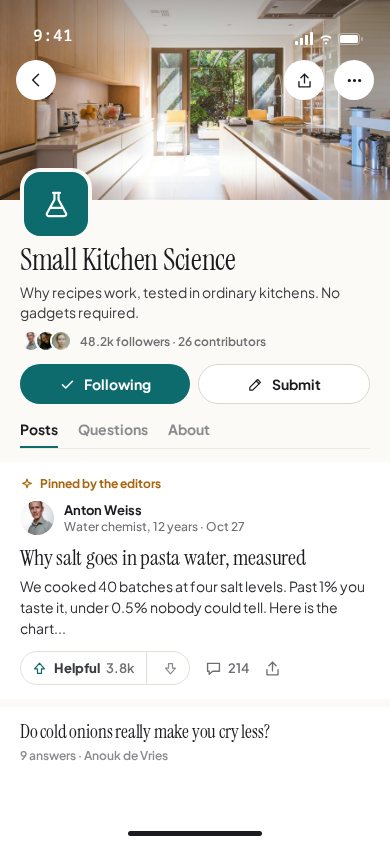
Quorum is a complete question and answer app: welcome, topic picking and sign in, a home feed of questions with their top answer, a question page with several ranked answers, a full answer with photos and comments, an answer composer, asking a question with topics and answer requests, a posted confirmation, answer requests, search and results, a topic, spaces and a space, notifications, a profile with credentials, editing credentials, answer stats, bookmarks, a Plus plan and settings. Paper white with a serif for questions, petrol teal and honey amber.
| Detail | Value |
|---|---|
| Screen type | Detail |
| App | Quorum: Questions and expert answers |
| Category | Social |
| Design language | Minimal, light |
| Type | Instrument Serif for headings, Plus Jakarta Sans for text |
| Colours | #fbfaf7 background, #ffffff surface, #1a1c1f text, #6e6f73 text-muted, #0d6b6e accent, #ffffff accent-contrast, #e09a33 secondary, #ebe8e1 border, #d14b3a danger |
What this screen says
- Small Kitchen Science
- Why recipes work, tested in ordinary kitchens. No gadgets required.
- 48.2k followers · 26 contributors
- Following
- Submit
- Posts Questions About
- Pinned by the editors
- Anton WeissWater chemist, 12 years · Oct 27
- Why salt goes in pasta water, measured
- We cooked 40 batches at four salt levels. Past 1% you taste it, under 0.5% nobody could tell. Here is the chart...
- Helpful3.8k 214
- Do cold onions really make you cry less?
- 9 answers · Anouk de Vries
Around it in Quorum
More detail screens
- Huddle Group: Interest groups and meetups
- Glade Post: Photo and clip social network
- Onair Send a gift: Live streaming
- Drift Group: Reels and voice rooms
- Glitz Chat: Party live streaming
- Hearth Group chat: Messenger for trips and circles
- Chirp Conversation: Messenger with file sharing
- Banter Chat: Live messenger
- Natter Chat: Minimal messenger
- Nearly Person: Dating by crossed paths
- Linkup Post: Professional network and jobs
- Backer Tiers: Support creators with memberships
Every social app detail screen
What makes a good detail screen
- Lead with what identifies the item. A large image or title, the price or status, and the key facts at the top. People should know they are in the right place at a glance.
- Keep the main action visible. A sticky bottom button for Add to cart, Book or Play stays reachable while people scroll through details.
- Order information by importance. The facts that decide the choice come first; reviews, specifications and fine print further down.
- Use progressive disclosure. Long descriptions, specifications and policies can expand on tap rather than filling the screen.
The full detail screen guide and every example
Remix Quorum free: describe your own app and it is drawn in this design. Or get its files from $10: Figma, React Native, SwiftUI, Flutter and HTML.