Templates · Detail screens · Social app · Hearth
Hearth Group chat screen
A detail screen from Hearth, a messenger for trips and circles app template in a Glass style. Screen 6 of 25.
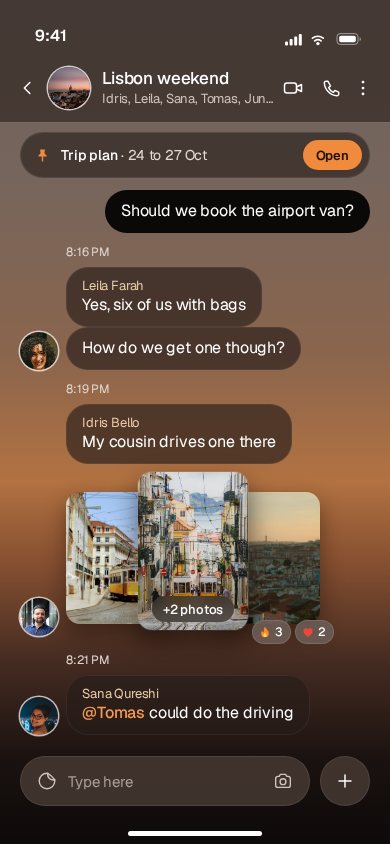
Hearth is a complete messenger built around close circles and the trips they plan: onboarding, phone sign in and a code, chats with story tiles and filters, group chats with shared photo stacks, reactions and a pinned plan, a trip plan with a day by day timeline, polls, live location on a map, a shared album, calls and a group video call, updates and stories, contact profiles with stats and media, insights, a plus plan, chat lock, privacy and settings. Warm dusk brown melting into black, frosted glass and ember orange.
| Detail | Value |
|---|---|
| Screen type | Detail |
| App | Hearth: Messenger for trips and circles |
| Category | Social |
| Design language | Glass, dark |
| Type | Geist |
| Colours | #0d0a09 background, #2a221f surface, #ffffff text, #a99e98 text-muted, #f08a3c accent, #1c0f06 accent-contrast, #e9cba8 secondary, #3a302c border, #f0453f danger |
What this screen says
- Lisbon weekend
- Idris, Leila, Sana, Tomas, Jun, Mateus
- Trip plan · 24 to 27 Oct Open
- Should we book the airport van?
- 8:16 PM
- Leila FarahYes, six of us with bags
- How do we get one though?
- 8:19 PM
- Idris BelloMy cousin drives one there
- +2 photos
- 8:21 PM
- Sana Qureshi@Tomas could do the driving
- Type here
Around it in Hearth
More detail screens
- Chirp Conversation: Messenger with file sharing
- Banter Chat: Live messenger
- Natter Chat: Minimal messenger
- Nearly Person: Dating by crossed paths
- Linkup Post: Professional network and jobs
- Quorum Question: Questions and expert answers
- Backer Tiers: Support creators with memberships
- Pledge Project: Back creative projects
- Civic Nearby issue: Report issues and city services
- Guild Channel: Community servers with voice and text chat
- Parrot Chat: Private messaging, groups and calls
- Carrier Chat: Cloud messaging with channels
Every social app detail screen
What makes a good detail screen
- Lead with what identifies the item. A large image or title, the price or status, and the key facts at the top. People should know they are in the right place at a glance.
- Keep the main action visible. A sticky bottom button for Add to cart, Book or Play stays reachable while people scroll through details.
- Order information by importance. The facts that decide the choice come first; reviews, specifications and fine print further down.
- Use progressive disclosure. Long descriptions, specifications and policies can expand on tap rather than filling the screen.
The full detail screen guide and every example
Remix Hearth free: describe your own app and it is drawn in this design. Or get its files from $10: Figma, React Native, SwiftUI, Flutter and HTML.