Templates · Success and confirmation screens · Social app · Quorum
Quorum Question posted screen
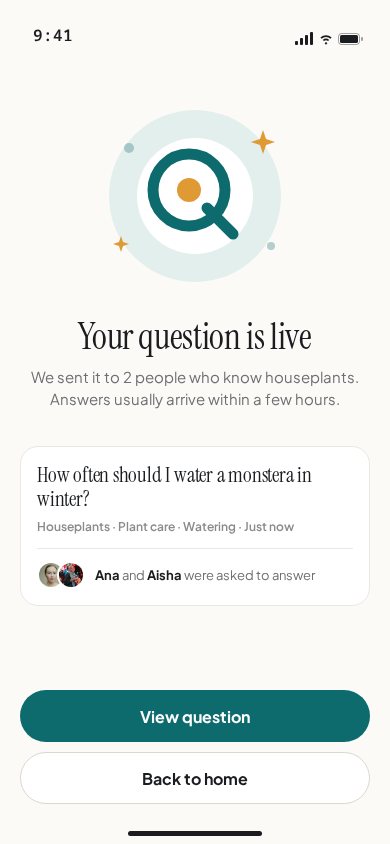
A success screen from Quorum, a questions and expert answers app template in a Minimal style. Screen 12 of 25.
Quorum is a complete question and answer app: welcome, topic picking and sign in, a home feed of questions with their top answer, a question page with several ranked answers, a full answer with photos and comments, an answer composer, asking a question with topics and answer requests, a posted confirmation, answer requests, search and results, a topic, spaces and a space, notifications, a profile with credentials, editing credentials, answer stats, bookmarks, a Plus plan and settings. Paper white with a serif for questions, petrol teal and honey amber.
| Detail | Value |
|---|---|
| Screen type | Success |
| App | Quorum: Questions and expert answers |
| Category | Social |
| Design language | Minimal, light |
| Type | Instrument Serif for headings, Plus Jakarta Sans for text |
| Colours | #fbfaf7 background, #ffffff surface, #1a1c1f text, #6e6f73 text-muted, #0d6b6e accent, #ffffff accent-contrast, #e09a33 secondary, #ebe8e1 border, #d14b3a danger |
What this screen says
- Your question is live
- We sent it to 2 people who know houseplants. Answers usually arrive within a few hours.
- How often should I water a monstera in winter?
- Houseplants · Plant care · Watering · Just now
- Ana and Aisha were asked to answer
- View question
- Back to home
Around it in Quorum
More success and confirmation screens
- Soapbox On the box: Weekly debates and polls
- Ballot Vote cast: Settle it on paper
- Murmur Welcome to Plus: Chat rooms for art lovers
- Wink Match: Video first dating
- Snoot Playdate set: Social app for pets
- Huddle You are going: Interest groups and meetups
- Glade Posted: Photo and clip social network
- Onair Stream ended: Live streaming
- Drift Room ended: Reels and voice rooms
- Glitz Top up complete: Party live streaming
- Hearth Circle ready: Messenger for trips and circles
- Chirp Upgraded: Messenger with file sharing
Every social app success screen
What makes a good confirmation screen
- Confirm in the headline. "Payment sent", "Table booked for Friday at 8" or "Lesson complete" in plain words, with a clear success colour or icon.
- Repeat the key details. Amount, date, reference number or score, so people do not need to check elsewhere that the right thing happened.
- Say what happens next. When the order arrives, when the money lands, when the next lesson unlocks.
- Offer the next step. Track the order, add to calendar, share, or start the next lesson. One primary action and a way back home.
The full confirmation screen guide and every example
Remix Quorum free: describe your own app and it is drawn in this design. Or get its files from $10: Figma, React Native, SwiftUI, Flutter and HTML.