Templates · List and feed screens · Music app · Quire
Quire Set lists screen
A list screen from Quire, a sheet music and practice app template in a Minimal style. Screen 16 of 25.
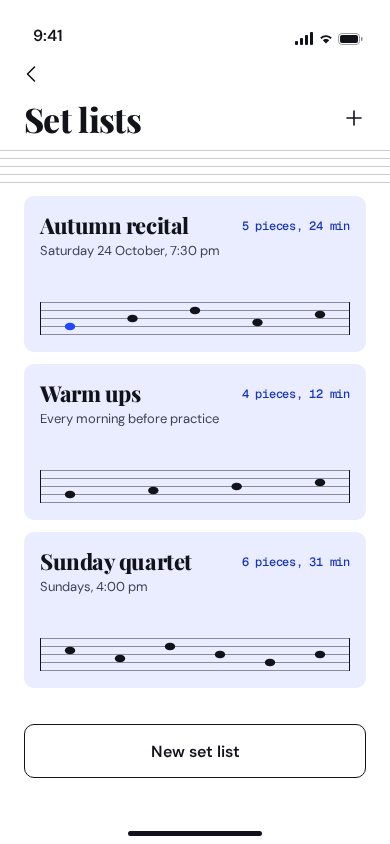
Quire is a complete sheet music and practice app: welcome, sign in, picking your instrument, a home with today's practice plan, a score library with search and composers, a piece page and a full page reader, a practice timer, a metronome and a tuner, set lists for recitals, progress per piece, a streak calendar, a Plus plan with checkout, notifications, profile and settings. Every stave, note and clef is drawn as SVG.
| Detail | Value |
|---|---|
| Screen type | List |
| App | Quire: Sheet music and practice |
| Category | Music |
| Design language | Minimal, light |
| Type | DM Sans |
| Colours | #ffffff background, #e9edff surface, #12131a text, #6b6f80 text-muted, #2346ff accent, #ffffff accent-contrast, #1632c4 secondary, #d9dbe6 border, #d8343f danger |
What this screen says
- Set lists
- Autumn recital
- 5 pieces, 24 min
- Saturday 24 October, 7:30 pm
- Warm ups
- 4 pieces, 12 min
- Every morning before practice
- Sunday quartet
- 6 pieces, 31 min
- Sundays, 4:00 pm
- New set list
Around it in Quire
More list and feed screens
- Sonata Season: Concert hall season and tickets
- Wax Queue: Music streaming
- Earshot Notifications: Podcast player
- Strum Notifications: Learn guitar, one chord at a time
- Gigly Lineup: Gig and festival tickets
- Padd Notifications: Beat maker
- Aria Store: Audiobook library
- Hum Library: Song recognition
- Riff Stream: Upload and discover new tracks
- Groove Collection: Vinyl collection and crate digging
- Crossfade Library: DJ mixing on the go
- Fork Presets: Tuner and metronome
What makes a good list screen
- Show what people need to decide. Each row should carry just enough to choose: a title, one or two details and a status. Everything else belongs on the detail screen.
- Keep rows consistent. The same information in the same place on every row lets people scan down a column instead of reading each item.
- Group with headings. Dates, categories or status headings break long lists into chunks people can skip through.
- Make common actions quick. Swipe actions, a checkbox or a heart on the row save opening the item for small tasks.
The full list screen guide and every example
Remix Quire free: describe your own app and it is drawn in this design. Or get its files from $10: Figma, React Native, SwiftUI, Flutter and HTML.