Templates · Form and input screens · Productivity app · Quill
Quill New task screen
A form screen from Quill, a productivity app template in a Minimal style. Screen 12 of 25.
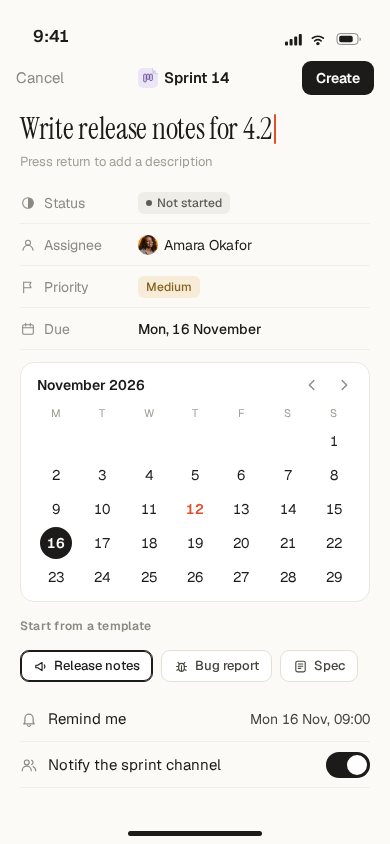
Quill is a complete everyday workspace: welcome and sign in with a code, a home with recent pages, events and my tasks, the page tree, a doc with cover, properties, to-dos, a callout and toggles, the slash menu over the keyboard, a verified team wiki, a database as a table, a board and a calendar, a task with properties and comments, a new task form, filters and sorts, search, templates, live meeting notes with a transcript, an assistant that answers from your pages, sharing, the inbox, workspace analytics, plans, checkout and a confirmation, account and settings. Paper white and ink with a vermilion accent.
| Detail | Value |
|---|---|
| Screen type | Form |
| App | Quill: Docs, wikis and databases in one workspace |
| Category | Productivity |
| Design language | Minimal, light |
| Type | Instrument Serif for headings, Geist for text |
| Colours | #fbfaf7 background, #ffffff surface, #1c1b19 text, #8c8982 text-muted, #e04f2e accent, #ffffff accent-contrast, #f3f1ec secondary, #ebe8e1 border, #b83a1d danger |
What this screen says
- Cancel Sprint 14Create
- Write release notes for 4.2
- Press return to add a description
- Status
- Not started
- Assignee
- Amara Okafor
- Priority
- Medium
- Due
- Mon, 16 November
- November 2026
- MTWTFSS 1 2 3 4 5 6 7 8 9 10 11 12 13 14 15 16 17 18 19 20 21 22 23 24 25 26 27 28 29
- Start from a template
- Release notes Bug report Spec
- Remind me Mon 16 Nov, 09:00
- Notify the sprint channel
Around it in Quill
More form and input screens
- Bench Post a job: Freelance marketplace
- Convene Join: Video meetings
- Unplug Choose apps: Screen time blocker
- Deskly Book a desk: Hybrid office booking
- Pomo New session: Focus timer
- Postbox Compose: Email for busy teams
- Daybook New event: Calendar and planner
- Scanly Sign: Document scanner
- Keyring New item: Password manager
- Rota Swap shift: Shift scheduling for hourly teams
- Inkwell Write: Daily journal
- Shortlist Filters: Job search and application tracker
Every productivity app form screen
What makes a good form screen
- Ask only what you need. Every field is a reason to stop. Remove optional fields or move them to later.
- Labels above fields. Visible labels stay readable while people type; placeholder-only labels disappear.
- Use the right keyboard and input. Number pads for amounts, email keyboards for email, pickers for dates and autofill for addresses and codes.
- Validate as people go. Show problems next to the field when people leave it, in words that say how to fix them.
The full form screen guide and every example
Remix Quill free: describe your own app and it is drawn in this design. Or get its files from $10: Figma, React Native, SwiftUI, Flutter and HTML.