Templates · Form and input screens · Productivity app · Bench
Bench Post a job screen
A form screen from Bench, a freelance marketplace app template in an Enterprise style. Screen 11 of 25.
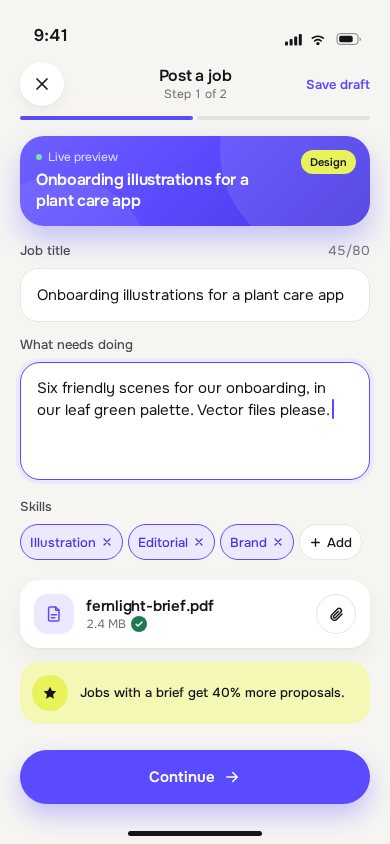
Bench is a complete freelance marketplace for clients: onboarding, role choice and sign in, a home with the contract that needs attention and top rated talent, categories, search with filters, a freelancer profile with portfolio, packages and reviews, posting a job with budget and timeline, proposals ranked by match score, messages and chat, sending an offer, a contract with a milestone timeline and escrow, milestone review, funding escrow, payments, leaving a review, profile and settings. Off white and white with ink, violet and lemon.
| Detail | Value |
|---|---|
| Screen type | Form |
| App | Bench: Freelance marketplace |
| Category | Productivity |
| Design language | Enterprise, light |
| Type | Onest |
| Colours | #f6f5f2 background, #ffffff surface, #14141a text, #6e6e7a text-muted, #5b4bff accent, #ffffff accent-contrast, #e9f25b secondary, #e8e6e0 border, #d9453d danger |
What this screen says
- Post a jobStep 1 of 2
- Save draft
- Live preview
- Onboarding illustrations for a plant care app
- Design
- Job title45/80
- What needs doing
- Six friendly scenes for our onboarding, in our leaf green palette. Vector files please.
- Skills
- Illustration Editorial Brand Add
- fernlight-brief.pdf2.4 MB
- Jobs with a brief get 40% more proposals.
- Continue
Around it in Bench
More form and input screens
- Pomo New session: Focus timer
- Postbox Compose: Email for busy teams
- Daybook New event: Calendar and planner
- Scanly Sign: Document scanner
- Keyring New item: Password manager
- Rota Swap shift: Shift scheduling for hourly teams
- Inkwell Write: Daily journal
- Shortlist Filters: Job search and application tracker
- Parley Create group: Team messenger
- Docket New task: Task and sprint planner
- Kanso New task: Tasks, calendar and chat
- Margin Edit note: AI note taking
Every productivity app form screen
What makes a good form screen
- Ask only what you need. Every field is a reason to stop. Remove optional fields or move them to later.
- Labels above fields. Visible labels stay readable while people type; placeholder-only labels disappear.
- Use the right keyboard and input. Number pads for amounts, email keyboards for email, pickers for dates and autofill for addresses and codes.
- Validate as people go. Show problems next to the field when people leave it, in words that say how to fix them.
The full form screen guide and every example
Remix Bench free: describe your own app and it is drawn in this design. Or get its files from $10: Figma, React Native, SwiftUI, Flutter and HTML.