Templates · Search and explore screens · Food app · Queue
Queue Search screen
A search screen from Queue, a join the waitlist from anywhere app template in a Neubrutalism style. Screen 6 of 25.
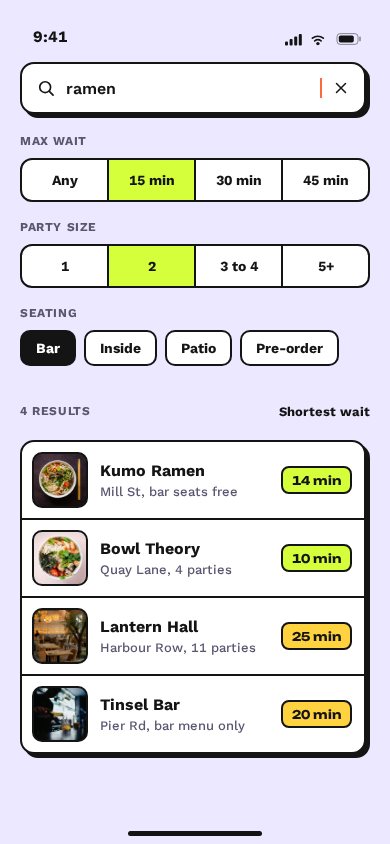
Queue is a complete restaurant waitlist app: welcome, phone sign in and code, a nearby home with your live place and short waits, a map of wait pins, search with wait and party filters, a restaurant page with busy hours, party size, review and a joined screen, a live place in line with a countdown ring, drinks to pre-order and pay for, running late or leave the line, a table ready hold timer, wait alerts, wait trends, visit history and a visit, favourites, a host view, a Plus plan, notifications, profile and settings. Lavender and white with ink outlines, tomato, lime, yellow and sky.
| Detail | Value |
|---|---|
| Screen type | Search |
| App | Queue: Join the waitlist from anywhere |
| Category | Food |
| Design language | Neubrutalism, light |
| Type | Unbounded for headings, Work Sans for text |
| Colours | #ece8ff background, #ffffff surface, #141414 text, #5b5670 text-muted, #ff6a3d accent, #141414 accent-contrast, #d4ff3a secondary, #141414 border, #ffd23f warning, #7ad3ff info, #c43414 danger |
What this screen says
- ramen
- Max wait
- Any 15 min 30 min 45 min
- Party size
- 1 2 3 to 4 5+
- Seating
- Bar
- Inside
- Patio
- Pre-order
- 4 results Shortest wait
- Kumo RamenMill St, bar seats free
- 14 min
- Bowl TheoryQuay Lane, 4 parties
- 10 min
- Lantern HallHarbour Row, 11 parties
- 25 min
- Tinsel BarPier Rd, bar menu only
- 20 min
Around it in Queue
More search and explore screens
- Lunchbox Ideas: School lunch planner for parents
- Agave Explore: Cocktails and home bar
- Crock Discover: Fermentation and sourdough starter log
- Curbside Map: Street food and food truck finder
- Forage Market: Farmers market and veg box
- Ember Cuts: Smoker and grill thermometer
- Steep Discover: Tea brewing and tasting notes
- Brigade Inventory: Restaurant kitchen and line ops
- Nibs Search: Food allergy and label scanner
- Ladle Search: Recipes and meal planning
- Pantry Aisles: Grocery delivery
- Brewly Search: Coffee ordering and loyalty
What makes a good search screen
- Show something before people type. Recent searches, popular items or categories make the empty search screen useful and save typing.
- Suggest as people type. Autocomplete with matching items, not only matching words, lets people jump straight to a result.
- Make filters visible and reversible. Show active filters as chips that can be removed in one tap, and the number of results as filters change.
- Forgive typos. Close matches and "Did you mean" stop a spelling mistake from ending in an empty screen.
The full search screen guide and every example
Remix Queue free: describe your own app and it is drawn in this design. Or get its files from $10: Figma, React Native, SwiftUI, Flutter and HTML.