Templates · List and feed screens · Education app · Quad
Quad Week screen
A list screen from Quad, a university campus app template in an Enterprise style. Screen 5 of 25.
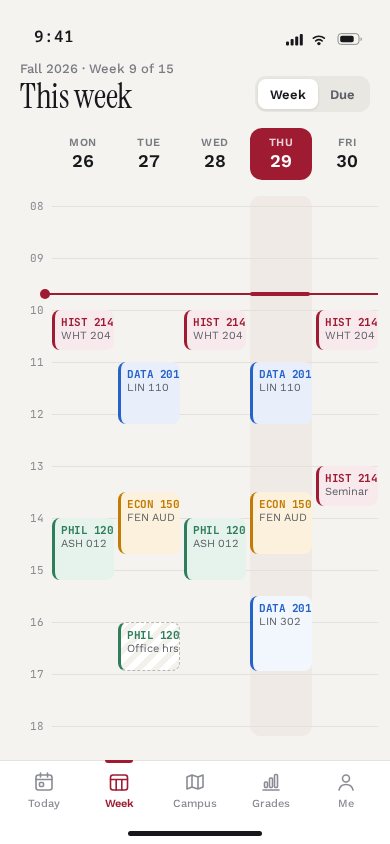
Quad is a complete campus app for a student at Calder University: welcome, sign in with a Calder ID and a code check, a Today home with the next class, a week timetable, class and course pages, a recorded lecture with chapters, assignments, a file submission with a receipt, grades with a GPA trend, next term's course search, enrollment and confirmation, a campus map, the library with live busyness, study room booking, a live shuttle, dining, meal plans, a digital campus ID, notifications, profile and settings. Stone and white with collegiate crimson, gold and four course colours.
| Detail | Value |
|---|---|
| Screen type | List |
| App | Quad: University campus app |
| Category | Education |
| Design language | Enterprise, light |
| Type | Instrument Serif for headings, Work Sans for text |
| Colours | #f4f3ef background, #ffffff surface, #17181c text, #7a7c84 text-muted, #9e1b32 accent, #ffffff accent-contrast, #f2b731 secondary, #e6e3dc border, #d2382f danger |
What this screen says
- Fall 2026 · Week 9 of 15
- This week
- Week
- Due
- MON26
- TUE27
- WED28
- THU29
- FRI30
- HIST 214WHT 204
- DATA 201LIN 110
- ECON 150FEN AUD
- PHIL 120ASH 012
- DATA 201LLIN 302
- HIST 214Seminar
- PHIL 120Office hrs
- Today
- Campus
- Grades
- Me
Around it in Quad
More list and feed screens
- Numo World map: Kids maths game
- Syntax Notifications: Learn to code
- Tuckin Notifications: Bedtime stories for kids
- Zenith Planets: Night sky guide
- Chalk Category: Design courses
- Encore Notifications: Creator courses
- Classroom Classwork: Class stream and assignments
- Studyhall Assigned: Free lessons and practice for school
- Tutor Reviews: Book online tutors for any skill
- Leaf Library: E-books and reading
- Almanac Contents: The free encyclopedia reader
- Tiles Archive: Daily word and number puzzles
Every education app list screen
What makes a good list screen
- Show what people need to decide. Each row should carry just enough to choose: a title, one or two details and a status. Everything else belongs on the detail screen.
- Keep rows consistent. The same information in the same place on every row lets people scan down a column instead of reading each item.
- Group with headings. Dates, categories or status headings break long lists into chunks people can skip through.
- Make common actions quick. Swipe actions, a checkbox or a heart on the row save opening the item for small tasks.
The full list screen guide and every example
Remix Quad free: describe your own app and it is drawn in this design. Or get its files from $10: Figma, React Native, SwiftUI, Flutter and HTML.