Templates · List and feed screens · Smart home app · Puddle
Puddle Notifications screen
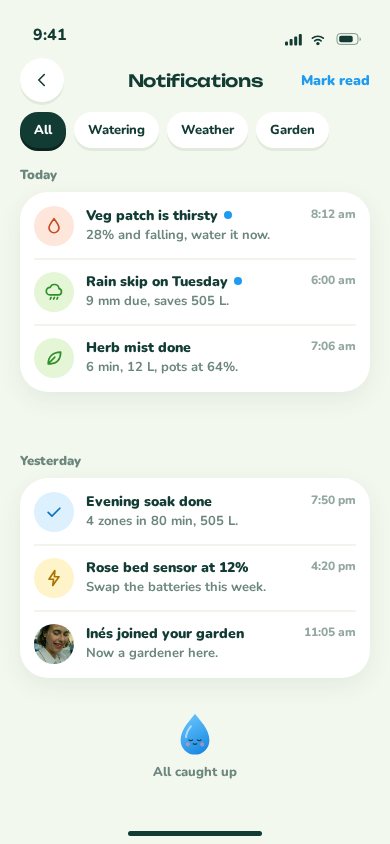
A list screen from Puddle, a garden watering and sprinklers app template in a Playful style. Screen 22 of 25.
Puddle is a complete smart sprinkler and garden watering app: welcome, pairing the controller, sign in, a garden home with every zone as a droplet gauge, zones and a zone page with soil moisture, a live watering run, a done screen, schedules and a schedule editor, adding a zone, a rain skip weather forecast, water usage, a plant library and plant care page, a drawn garden map, a camera plant check, a shop with a product, basket and order placed, notifications, a Plus plan, profile and settings. Sprout green and white with pond blue water, leaf green, sun yellow and clay.
| Detail | Value |
|---|---|
| Screen type | List |
| App | Puddle: Garden watering and sprinklers |
| Category | Smart home |
| Design language | Playful, light |
| Type | Unbounded for headings, Nunito for text |
| Colours | #f3f8ee background, #ffffff surface, #123b34 text, #6b867d text-muted, #1e9bf0 accent, #ffffff accent-contrast, #5cc23a secondary, #e1eadc border, #f0784a danger |
What this screen says
- Notifications
- Mark read
- All Watering Weather Garden
- Today
- Veg patch is thirsty28% and falling, water it now.
- 8:12 am
- Rain skip on Tuesday9 mm due, saves 505 L.
- 6:00 am
- Herb mist done6 min, 12 L, pots at 64%.
- 7:06 am
- Yesterday
- Evening soak done4 zones in 80 min, 505 L.
- 7:50 pm
- Rose bed sensor at 12%Swap the batteries this week.
- 4:20 pm
- Inés joined your gardenNow a gardener here.
- 11:05 am
- All caught up
Around it in Puddle
More list and feed screens
- Kelvin Rooms: Climate and thermostat
- Glow Rooms: Light scenes and colour
- Tagged Rooms: Home inventory for insurance
- Lobby Packages: Apartment building app
- Sweep Rooms: Robot vacuum and mop
- Dusk Notifications: Smart home scenarios
- Lumen Notifications: Smart home energy
- Abode Notifications: Smart home devices
- Boxed Inventory: Book movers and plan moving day
- Meter Readings: Your energy supplier account
- Couch Episodes: TV remote, casting and watchlist
- Chime Devices: Voice assistant and smart speaker
Every smart home app list screen
What makes a good list screen
- Show what people need to decide. Each row should carry just enough to choose: a title, one or two details and a status. Everything else belongs on the detail screen.
- Keep rows consistent. The same information in the same place on every row lets people scan down a column instead of reading each item.
- Group with headings. Dates, categories or status headings break long lists into chunks people can skip through.
- Make common actions quick. Swipe actions, a checkbox or a heart on the row save opening the item for small tasks.
The full list screen guide and every example
Remix Puddle free: describe your own app and it is drawn in this design. Or get its files from $10: Figma, React Native, SwiftUI, Flutter and HTML.