Templates · Form and input screens · Education app · Proof
Proof Question screen
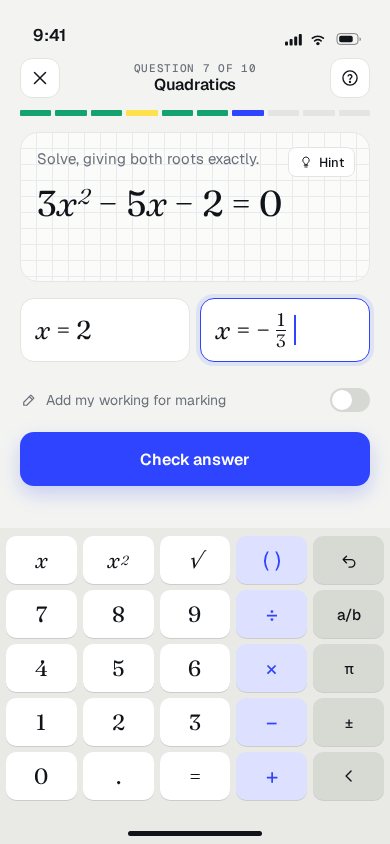
A form screen from Proof, an education app template in a Clinical style. Screen 11 of 25.
Proof is a complete maths tutor: welcome, level setup and sign in, a home with today's practice and a problem in progress, a camera that scans a question, a numbered step by step solution with a why this step explainer, a graph, a follow up chat, practice sets with a maths keyboard, a marked check of your own working and a results screen, a syllabus of topics with mastery, a topic page, search, progress, a timed mock exam, live tutors with booking and confirmation, a Plus plan, notifications, profile and settings. Paper white and graph grids with cobalt, highlighter yellow and a marking red.
| Detail | Value |
|---|---|
| Screen type | Form |
| App | Proof: Maths tutor that shows its working |
| Category | Education |
| Design language | Clinical, light |
| Type | Instrument Serif for headings, Geist for text |
| Colours | #f3f4f1 background, #ffffff surface, #101318 text, #6a707a text-muted, #2e44ff accent, #ffffff accent-contrast, #ffe14d secondary, #e3e5e0 border, #e4483c danger |
What this screen says
- Question 7 of 10Quadratics
- Solve, giving both roots exactly.
- 3x2 − 5x − 2 = 0
- Hint
- x = 2
- x = −13
- Add my working for marking
- Check answer
- x x2 √ ( )
- 7 8 9 ÷ a/b
- 4 5 6 × π
- 1 2 3 − ±
- 0 . = +
Around it in Proof
More form and input screens
- Tiles Share result: Daily word and number puzzles
- Stacks Renew: Borrow e-books and audiobooks from your library
- Penpal Correct: Language exchange chat
- Lexis Quiz: A word a day
- Quanta Quiz: Interactive physics lessons
- Cram New card: Exam prep and mock tests
- Quad Submit: University campus app
- Palm Quiz: Learn sign language
- Epoch Quiz: History on a timeline
- Wren Trace: Early reading for kids
- Skim Your goal: Speed reading trainer
- Terra Quiz setup: Geography and flags quiz
Every education app form screen
What makes a good form screen
- Ask only what you need. Every field is a reason to stop. Remove optional fields or move them to later.
- Labels above fields. Visible labels stay readable while people type; placeholder-only labels disappear.
- Use the right keyboard and input. Number pads for amounts, email keyboards for email, pickers for dates and autofill for addresses and codes.
- Validate as people go. Show problems next to the field when people leave it, in words that say how to fix them.
The full form screen guide and every example
Remix Proof free: describe your own app and it is drawn in this design. Or get its files from $10: Figma, React Native, SwiftUI, Flutter and HTML.