Templates · List and feed screens · Finance app · Prism
Prism Goals screen
A list screen from Prism, a finance app template in a Glass style. Screen 20 of 25.
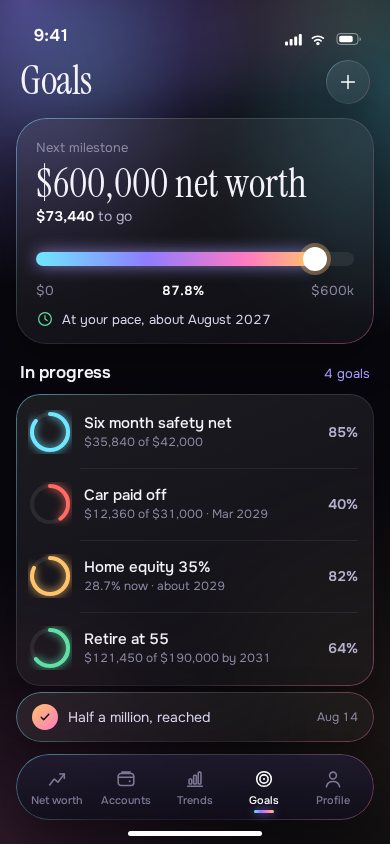
Prism is a complete net worth app: a prism welcome, picking institutions, sign in, a net worth home with a spectrum bar, accounts grouped by class, a brokerage account, a holding, a home with equity against its mortgage, debts with payoff bars, activity across every account, search, a twelve month trend with what moved it, an allocation ring, cash flow, adding and securely linking an account with a live sync and a success screen, a manual asset form, goals, a story style monthly recap, Prism Pro, notifications, profile and settings. Ink black and frosted glass split into amber, violet, mint, cyan and pink.
| Detail | Value |
|---|---|
| Screen type | List |
| App | Prism: Net worth across every account |
| Category | Finance |
| Design language | Glass, dark |
| Type | Instrument Serif for headings, Onest for text |
| Colours | #08070d background, #1a1824 surface, #f4f2fb text, #8d89a3 text-muted, #8f7dff accent, #0b0a12 accent-contrast, #6fe7ff secondary, #2a2638 border, #ff6b5e danger |
What this screen says
- Goals
- Next milestone
- $600,000 net worth
- $73,440 to go
- $0 87.8% $600k
- At your pace, about August 2027
- In progress
- 4 goals
- Six month safety net
- $35,840 of $42,000
- Car paid off
- $12,360 of $31,000 · Mar 2029
- Home equity 35%
- 28.7% now · about 2029
- Retire at 55
- $121,450 of $190,000 by 2031
- Half a million, reachedAug 14
- Net worth
- Accounts
- Trends
- Profile
Around it in Prism
More list and feed screens
- Bastion Pay and transfer: Everyday banking from a big bank
- Later Payments: Buy now, pay in four
- Standing Report: Credit score and reports
- Accrue Pots: Retirement and pension planner
- Levy Income: Taxes for freelancers
- Bullion Holdings: Gold and silver savings
- Wage Shifts: Get paid as you work
- Keystone Schedule: Mortgage and home loan tracker
- Rebate Activity: Cashback card and rewards
- Aegis Policies: Insurance policies and claims
- Till Sales: Card reader and sales for small shops
- Strike Option chain: Options trading
What makes a good list screen
- Show what people need to decide. Each row should carry just enough to choose: a title, one or two details and a status. Everything else belongs on the detail screen.
- Keep rows consistent. The same information in the same place on every row lets people scan down a column instead of reading each item.
- Group with headings. Dates, categories or status headings break long lists into chunks people can skip through.
- Make common actions quick. Swipe actions, a checkbox or a heart on the row save opening the item for small tasks.
The full list screen guide and every example
Remix Prism free: describe your own app and it is drawn in this design. Or get its files from $10: Figma, React Native, SwiftUI, Flutter and HTML.