Templates · Success and confirmation screens · Lifestyle app · Postage
Postage Label screen
A success screen from Postage, a lifestyle app template in an Enterprise style. Screen 15 of 25.
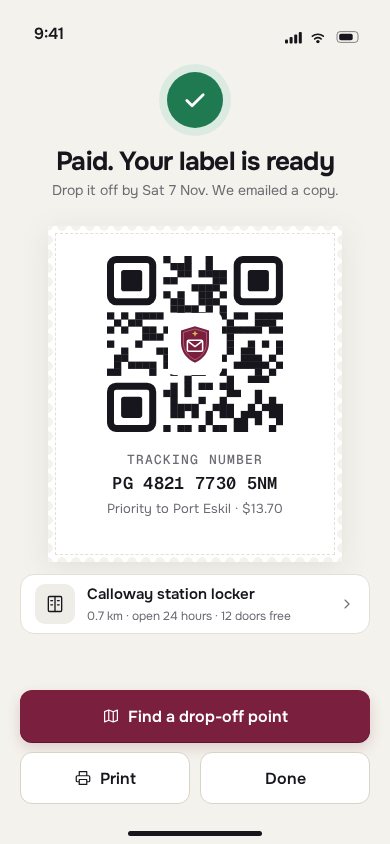
Postage is a complete postal service app: welcome, sign in, address check, a home with today's delivery, a track list, an item timeline, a live van map, redelivery, hold mail and a barcode scanner, then a four step send flow (size and weight, destination, speed and price compare, pay) ending in a QR label. Offices and lockers on a map, a branch with hours, a locker drop code, stamps, a PO box, sending stats, alerts, a frequent sender plan, account and settings. Warm paper and white with claret, brass and a calm green for delivered.
| Detail | Value |
|---|---|
| Screen type | Success |
| App | Postage: Send parcels and find drop-off points |
| Category | Lifestyle |
| Design language | Enterprise, light |
| Type | Fraunces for headings, Onest for text |
| Colours | #f4f2ec background, #ffffff surface, #17161c text, #6d6a73 text-muted, #7a1f3d accent, #ffffff accent-contrast, #c8962e secondary, #e4e0d6 border, #1f7a52 success, #b4232f danger |
What this screen says
- Paid. Your label is ready
- Drop it off by Sat 7 Nov. We emailed a copy.
- Tracking number
- PG 4821 7730 5NM
- Priority to Port Eskil · $13.70
- Calloway station locker0.7 km · open 24 hours · 12 doors free
- Find a drop-off point
- Done
Around it in Postage
More success and confirmation screens
- Column Subscribed: Newsletters and independent writers
- Fetch Booked: Dog walkers and pet sitters
- Forecourt Reserved: Buy and sell used cars
- Tower All set: Mobile plan, data and bills
- Haul Order placed: Bargain fashion and finds
- Muse Subscribed: AI image studio
- Admit Booked: Events and tickets near you
- Arcade Purchased: Game store, library and friends
- Natal Reading booked: Birth charts and daily astrology
- Sillage Order placed: Fragrance wardrobe
- Hamper Gift sent: Wishlists and gift registry
- Fade Booked: Barber booking
Every lifestyle app success screen
What makes a good confirmation screen
- Confirm in the headline. "Payment sent", "Table booked for Friday at 8" or "Lesson complete" in plain words, with a clear success colour or icon.
- Repeat the key details. Amount, date, reference number or score, so people do not need to check elsewhere that the right thing happened.
- Say what happens next. When the order arrives, when the money lands, when the next lesson unlocks.
- Offer the next step. Track the order, add to calendar, share, or start the next lesson. One primary action and a way back home.
The full confirmation screen guide and every example
Remix Postage free: describe your own app and it is drawn in this design. Or get its files from $10: Figma, React Native, SwiftUI, Flutter and HTML.