Templates · Success and confirmation screens · Lifestyle app · Admit
Admit Booked screen
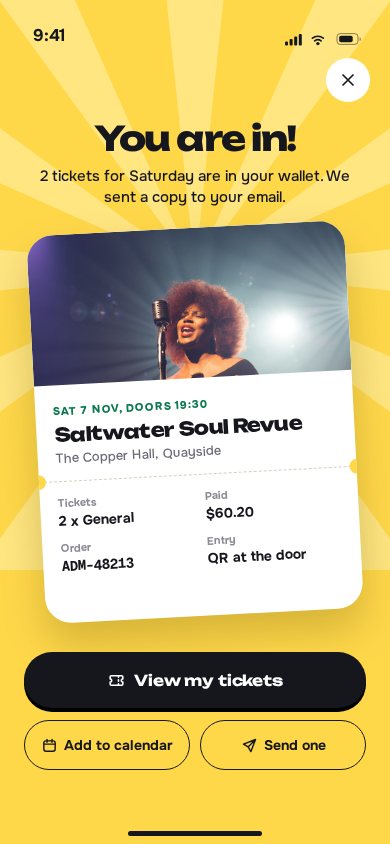
A success screen from Admit, an events and tickets near you app template in a Playful style. Screen 12 of 25.
Admit is a complete local events app: welcome, interests and sign in, a discover home, search with categories, a weekend list by date, a map of what is on, event pages with the organiser, ticket tiers, checkout and a booked screen, a ticket wallet with QR codes and transfers, likes, followed organisers, notifications, a Plus plan, profile and settings, and a host mode with sales, a create event form, a guest list and a check in scanner. Oat and white with jade, sunflower and bubblegum.
| Detail | Value |
|---|---|
| Screen type | Success |
| App | Admit: Events and tickets near you |
| Category | Lifestyle |
| Design language | Playful, light |
| Type | Unbounded for headings, Onest for text |
| Colours | #f6f3ec background, #ffffff surface, #16161d text, #6e6b78 text-muted, #14a06a accent, #ffffff accent-contrast, #ffd84a secondary, #ff8fb8 tertiary, #e8e3d8 border, #f0533e danger |
What this screen says
- You are in!
- 2 tickets for Saturday are in your wallet. We sent a copy to your email.
- SAT 7 NOV, DOORS 19:30Saltwater Soul Revue
- The Copper Hall, Quayside
- Tickets2 x General
- Paid$60.20
- OrderADM-48213
- EntryQR at the door
- View my tickets
- Add to calendar
- Send one
Around it in Admit
More success and confirmation screens
- Trellis Harvest logged: Vegetable garden planner
- Grain Exported: Camera and photo editor
- Posy Confirmed: Flower delivery and weekly stems
- Fern Watered: Plant care
- Doorstep Viewing booked: Homes for sale and rent
- Rewear Listed: Secondhand fashion marketplace
- Laced Entry confirmed: Sneaker drops and raffles
- Gloss Booked: Salon and spa booking
- Vow Visit booked: Wedding planner
- Drizzle Welcome to Plus: Weather with living skies
- Byline Puzzle solved: Daily news reader
- Shelf Book finished: Reading tracker and book club
Every lifestyle app success screen
What makes a good confirmation screen
- Confirm in the headline. "Payment sent", "Table booked for Friday at 8" or "Lesson complete" in plain words, with a clear success colour or icon.
- Repeat the key details. Amount, date, reference number or score, so people do not need to check elsewhere that the right thing happened.
- Say what happens next. When the order arrives, when the money lands, when the next lesson unlocks.
- Offer the next step. Track the order, add to calendar, share, or start the next lesson. One primary action and a way back home.
The full confirmation screen guide and every example
Remix Admit free: describe your own app and it is drawn in this design. Or get its files from $10: Figma, React Native, SwiftUI, Flutter and HTML.