Templates · Success and confirmation screens · Social app · Pledge
Pledged screen
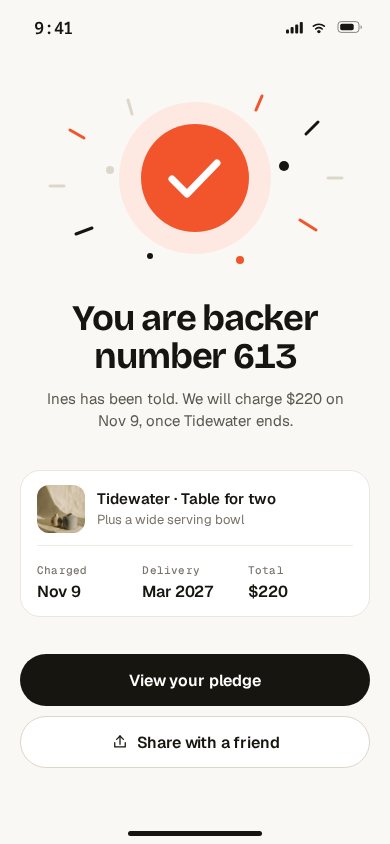
A success screen from Pledge, a back creative projects app template in a Minimal style. Screen 12 of 25.
Pledge is a complete crowdfunding app for backers and creators: welcome, interests, sign in, a discover feed, search and category browsing, a project page with its funding line, a campaign video, reward tiers, add-ons, pledge checkout and confirmation, backed projects with pledge status, creator updates and comments, a creator profile, a creator dashboard with funding over time, a new project form, activity, saved projects, a membership plan, profile and settings. Paper white and ink with a single persimmon accent.
| Detail | Value |
|---|---|
| Screen type | Success |
| App | Pledge: Back creative projects |
| Category | Social |
| Design language | Minimal, light |
| Type | Bricolage Grotesque for headings, Geist for text |
| Colours | #faf8f5 background, #ffffff surface, #17150f text, #7a756c text-muted, #f2552c accent, #fde9e1 accent-soft, #17150f secondary, #ebe6de border, #2f6bd8 info |
What this screen says
- You are backer number 613
- Ines has been told. We will charge $220 on Nov 9, once Tidewater ends.
- Tidewater · Table for two
- Plus a wide serving bowl
- Charged Nov 9
- Delivery Mar 2027
- Total $220
- View your pledge
- Share with a friend
Around it in Pledge
More success and confirmation screens
- Natter Community ready: Minimal messenger
- Nearly Match: Dating by crossed paths
- Linkup Applied: Professional network and jobs
- Quorum Question posted: Questions and expert answers
- Backer Joined: Support creators with memberships
- Civic Report sent: Report issues and city services
- Guild Plus active: Community servers with voice and text chat
- Parrot Payment sent: Private messaging, groups and calls
- Carrier Post scheduled: Cloud messaging with channels
- Vista Shared: Photos, stories and reels
- Flick Posted: Short video feed
- Squawk You are Plus: Short posts and live conversation
Every social app success screen
What makes a good confirmation screen
- Confirm in the headline. "Payment sent", "Table booked for Friday at 8" or "Lesson complete" in plain words, with a clear success colour or icon.
- Repeat the key details. Amount, date, reference number or score, so people do not need to check elsewhere that the right thing happened.
- Say what happens next. When the order arrives, when the money lands, when the next lesson unlocks.
- Offer the next step. Track the order, add to calendar, share, or start the next lesson. One primary action and a way back home.
The full confirmation screen guide and every example
Remix Pledge free: describe your own app and it is drawn in this design. Or get its files from $10: Figma, React Native, SwiftUI, Flutter and HTML.