Templates · Form and input screens · Social app · Pledge
Pledge New project screen
A form screen from Pledge, a back creative projects app template in a Minimal style. Screen 20 of 25.
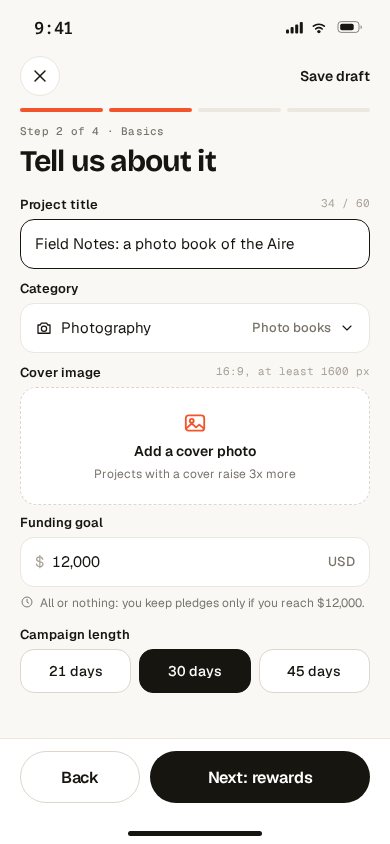
Pledge is a complete crowdfunding app for backers and creators: welcome, interests, sign in, a discover feed, search and category browsing, a project page with its funding line, a campaign video, reward tiers, add-ons, pledge checkout and confirmation, backed projects with pledge status, creator updates and comments, a creator profile, a creator dashboard with funding over time, a new project form, activity, saved projects, a membership plan, profile and settings. Paper white and ink with a single persimmon accent.
| Detail | Value |
|---|---|
| Screen type | Form |
| App | Pledge: Back creative projects |
| Category | Social |
| Design language | Minimal, light |
| Type | Bricolage Grotesque for headings, Geist for text |
| Colours | #faf8f5 background, #ffffff surface, #17150f text, #7a756c text-muted, #f2552c accent, #fde9e1 accent-soft, #17150f secondary, #ebe6de border, #2f6bd8 info |
What this screen says
- Save draft
- Step 2 of 4 · Basics
- Tell us about it
- Project title34 / 60
- Field Notes: a photo book of the Aire
- Category
- PhotographyPhoto books
- Cover image16:9, at least 1600 px
- Add a cover photoProjects with a cover raise 3x more
- Funding goal
- $12,000USD
- All or nothing: you keep pledges only if you reach $12,000.
- Campaign length
- 21 days 30 days 45 days
- Back
- Next: rewards
Around it in Pledge
More form and input screens
- Nearly About you: Dating by crossed paths
- Linkup New post: Professional network and jobs
- Quorum Write answer: Questions and expert answers
- Backer New post: Support creators with memberships
- Civic Pin location: Report issues and city services
- Guild Create server: Community servers with voice and text chat
- Parrot Your profile: Private messaging, groups and calls
- Carrier New channel: Cloud messaging with channels
- Vista New post: Photos, stories and reels
- Flick Share: Short video feed
- Squawk Compose: Short posts and live conversation
- Agora Reply: Communities, threads and votes
What makes a good form screen
- Ask only what you need. Every field is a reason to stop. Remove optional fields or move them to later.
- Labels above fields. Visible labels stay readable while people type; placeholder-only labels disappear.
- Use the right keyboard and input. Number pads for amounts, email keyboards for email, pickers for dates and autofill for addresses and codes.
- Validate as people go. Show problems next to the field when people leave it, in words that say how to fix them.
The full form screen guide and every example
Remix Pledge free: describe your own app and it is drawn in this design. Or get its files from $10: Figma, React Native, SwiftUI, Flutter and HTML.