Templates · Onboarding screens · Fitness app · Plate
Plate Daily targets screen
An onboarding screen from Plate, a calorie and macro tracker app template in a Clinical style. Screen 5 of 25.
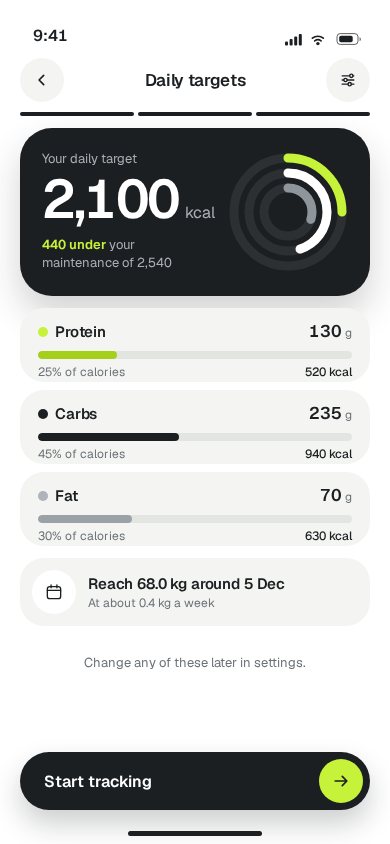
Plate is a complete calorie and macro tracking app: welcome, sign in, goal and daily target setup, a today screen with calories eaten, planned and left, a diary by meal, food search, a food with its serving and nutrition label, barcode and photo scanning, quick add on a keypad, a meal in detail, macro rings, water, recipes, weight with a trend line, a weekly report, a Plus plan, notifications, profile and settings. Eaten is solid, planned is hatched, and every number carries its unit.
| Detail | Value |
|---|---|
| Screen type | Onboarding |
| App | Plate: Calorie and macro tracker |
| Category | Health and fitness |
| Design language | Clinical, light |
| Type | Geist |
| Colours | #ffffff background, #f4f5f2 surface, #1c1f22 text, #6c7278 text-muted, #c7f23a accent, #1c1f22 accent-contrast, #aeb4b9 secondary, #e6e8e3 border, #e5484d danger |
What this screen says
- Daily targets
- Your daily target
- 2,100kcal
- 440 under your maintenance of 2,540
- Protein
- 130 g
- 25% of calories 520 kcal
- Carbs
- 235 g
- 45% of calories 940 kcal
- Fat
- 70 g
- 30% of calories 630 kcal
- Reach 68.0 kg around 5 Dec
- At about 0.4 kg a week
- Change any of these later in settings.
- Start tracking
Around it in Plate
More onboarding screens
- Cradle Welcome: Baby tracker
- Medly Welcome: Doctor on call
- Donor Welcome: Blood donation, counted drop by drop
- Unfold Welcome: Yoga and stretching
- Kilo Welcome: Strength training log
- Cyra Welcome: Cycle tracker
- Harbor Welcome: Therapy and mood
- Fasten Welcome: Intermittent fasting
- Vita Welcome: Personal health record
- Forge Welcome: AI fitness and nutrition
- Lull Welcome: Sleep sounds and meditation
- Pace Welcome: Fitness tracker
Every fitness app onboarding screen
What makes a good onboarding screen
- One idea per screen. Each screen should say one thing in a headline people can read in a second. If a screen needs a paragraph, it is doing too much.
- Personalise with a purpose. Ask a question only if the answer changes what people see next, like a goal, a level or an interest. Then show that the answer mattered.
- Explain permissions before asking. Show your own screen saying why you need notifications, location or the camera before the system prompt. People who understand the reason are more likely to allow it.
- Let people skip. A visible skip or "I'll do this later" respects returning users and the impatient. Make sure skipping still lands them somewhere useful.
The full onboarding screen guide and every example
Remix Plate free: describe your own app and it is drawn in this design. Or get its files from $10: Figma, React Native, SwiftUI, Flutter and HTML.