Templates · Sign in and sign up screens · Travel app · Pitch
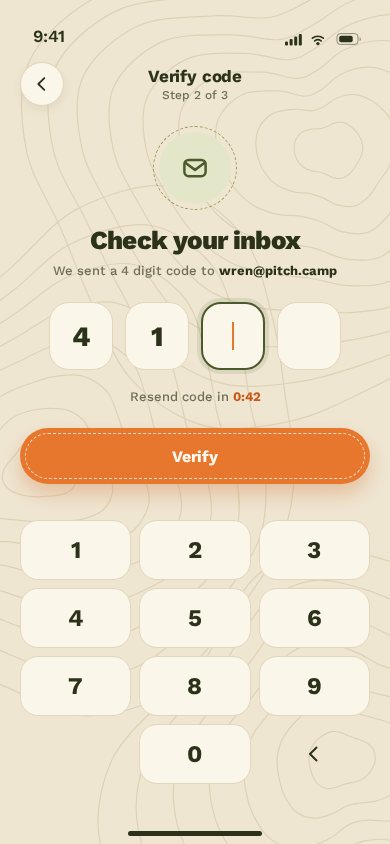
Pitch Verify code screen
A sign in screen from Pitch, a campsite booking and trip kit app template in a Playful style. Screen 4 of 25.
Pitch is a complete camping app: welcome, sign in, a code and a camp style picker, a home with illustrated campsite cards, search, a contour map, a campsite page, dates, picking a pitch on the site map, checkout and a booked screen, trips and a trip hub, a packing list, the weather at camp, trails with an elevation profile, a trip log with earned badges, a Plus plan, notifications, profile and settings. Every landscape, tent, tree and badge is drawn, and cards are stitched like canvas patches.
| Detail | Value |
|---|---|
| Screen type | Sign in |
| App | Pitch: Campsite booking and trip kit |
| Category | Travel |
| Design language | Playful, light |
| Type | Work Sans |
| Colours | #efe6d2 background, #fbf6ea surface, #2b3219 text, #77765c text-muted, #e8772e accent, #fffaf0 accent-contrast, #4b5a2a secondary, #dccfb2 border, #c2452d danger |
What this screen says
- Verify codeStep 2 of 3
- Check your inbox
- We sent a 4 digit code to wren@pitch.camp
- Resend code in 0:42
- Verify
Around it in Pitch
More sign in and sign up screens
- Staya Sign in: Homes and stays from local hosts
- Lodge Sign in: Hotels, deals and reservations
- Fare Sign in: Flight search and price alerts
- Rove Sign in: Reviews and things to do
- Ignition Sign in: Car rental from local hosts
- Contrail Sign in: Airline booking, check-in and boarding
- Keycard Sign in: Hotel stays, digital key and room service
- Detour Sign in: Community driving navigation
- Convoy Sign up: Carpooling between cities
- Manifest Sign in: Trip plans from your confirmation emails
- Roadster Sign in: Your electric car, from your phone
- Fairground Sign in: Theme park tickets, wait times and map
Every travel app sign in screen
What makes a good login screen
- Offer the fastest option first. Sign in with Apple, Google or a passkey takes one tap. If you support them, put them above the email form. Apple asks apps that use a third-party login like Google to also offer an equivalent privacy-focused option, such as Sign in with Apple.
- Separate sign in from sign up clearly. Use different headings and buttons, and a clear link to switch. People who already have an account should never end up creating a second one by accident.
- Use the right keyboard and autofill. Email fields should open the email keyboard and support password managers and one-time code autofill. Small details, big difference in how many people get through.
- Write errors that help. "That password doesn't match this email" is better than "Error 401". Keep what people typed so they only fix the part that was wrong.
The full login screen guide and every example
Remix Pitch free: describe your own app and it is drawn in this design. Or get its files from $10: Figma, React Native, SwiftUI, Flutter and HTML.