Templates · Sign in and sign up screens · Travel app · Roadster
Roadster Sign in screen
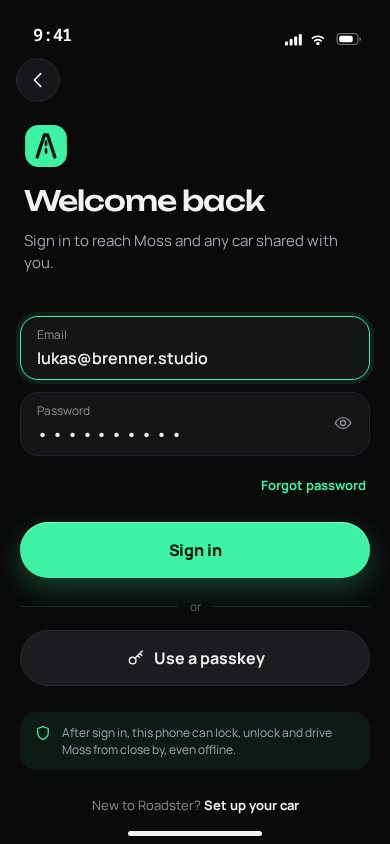
A sign in screen from Roadster, a travel app template in a Dark-first style. Screen 2 of 25.
Roadster is a complete app for owning an electric car: welcome, sign in, phone key setup, a car home with range, lock and quick controls, controls with trunks, lights and tyre pressures, climate with a temperature arc and seat heaters, a live charging session, a charge schedule with off-peak prices, nearby fast chargers, the car on a map, moving it with the front camera, trips and a trip with its consumption, monthly energy, service with booking, a slot and a confirmation, phone keys and sharing a key, a software update, a Plus plan, alerts, account and settings. Asphalt black with charge green and heat amber.
| Detail | Value |
|---|---|
| Screen type | Sign in |
| App | Roadster: Your electric car, from your phone |
| Category | Travel |
| Design language | Dark-first, dark |
| Type | Unbounded for headings, Manrope for text |
| Colours | #0a0a0b background, #141517 surface, #f2f2ef text, #8c8e94 text-muted, #3df2a3 accent, #03140c accent-contrast, #ff9a3d secondary, #232428 border, #ff5a52 danger |
What this screen says
- Welcome back
- Sign in to reach Moss and any car shared with you.
- lukas@brenner.studio
- Password
- ••••••••••
- Forgot password
- Sign in
- or
- Use a passkey
- After sign in, this phone can lock, unlock and drive Moss from close by, even offline.
- New to Roadster? Set up your car
Around it in Roadster
More sign in and sign up screens
- Scoot Sign in: E-scooter and e-bike rental
- Nomad Sign in: Travel eSIM data plans
- Tern Sign in: Ferry and island hopping
- Berth Sign in: Night trains and sleeper cabins
- Caravan Sign in: Campervan rental and road trips
- Layover Sign in: Airport guide, gates and lounges
- Permit Sign in: Visas and travel documents wallet
- Backroad Sign in: Road trip planner with stops
- Bunk Sign in: Hostels and backpacker meetups
- Piazza Sign in: Self-guided city walking tours
- Fjord Sign in: Cruise companion on board
- Kerb Sign in: Parking that reads like a road sign
Every travel app sign in screen
What makes a good login screen
- Offer the fastest option first. Sign in with Apple, Google or a passkey takes one tap. If you support them, put them above the email form. Apple asks apps that use a third-party login like Google to also offer an equivalent privacy-focused option, such as Sign in with Apple.
- Separate sign in from sign up clearly. Use different headings and buttons, and a clear link to switch. People who already have an account should never end up creating a second one by accident.
- Use the right keyboard and autofill. Email fields should open the email keyboard and support password managers and one-time code autofill. Small details, big difference in how many people get through.
- Write errors that help. "That password doesn't match this email" is better than "Error 401". Keep what people typed so they only fix the part that was wrong.
The full login screen guide and every example
Remix Roadster free: describe your own app and it is drawn in this design. Or get its files from $10: Figma, React Native, SwiftUI, Flutter and HTML.