Templates · Detail screens · Productivity app · Pipeline
Pipeline Account screen
A detail screen from Pipeline, a sales CRM on the road app template in an Enterprise style. Screen 8 of 25.
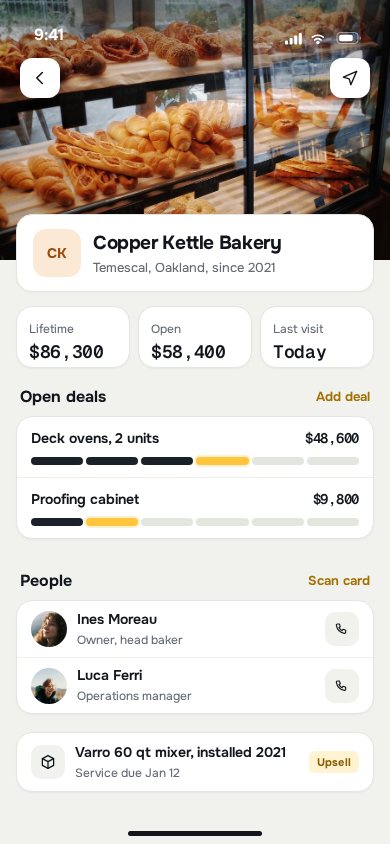
Pipeline is a complete field sales CRM: welcome and sign in, a Today screen with the next stop and quota, a live route map, check in on arrival, a stage board pipeline, deal, account and contact pages, search and a map of nearby accounts, visit logging with a voice note and a business card scanner, a new deal form, a quote with on device sign off and a deal won screen, a forecast dashboard, activity, tasks, notifications, a Pro plan, profile and settings. Stone grey and white with asphalt and marigold.
| Detail | Value |
|---|---|
| Screen type | Detail |
| App | Pipeline: Sales CRM on the road |
| Category | Productivity |
| Design language | Enterprise, light |
| Type | Onest |
| Colours | #f1f2ee background, #ffffff surface, #12161c text, #646b75 text-muted, #ffc53d accent, #12161c accent-contrast, #1b2128 secondary, #e3e5df border, #d9453b danger |
What this screen says
- CK
- Copper Kettle Bakery
- Temescal, Oakland, since 2021
- Lifetime $86,300
- Open $58,400
- Last visit Today
- Open deals
- Add deal
- Deck ovens, 2 units
- Proofing cabinet
- People
- Scan card
- Ines Moreau
- Owner, head baker
- Luca Ferri
- Operations manager
- Varro 60 qt mixer, installed 2021
- Service due Jan 12
- Upsell
Around it in Pipeline
More detail screens
- Deskly Desk: Hybrid office booking
- Pomo Task: Focus timer
- Postbox Thread: Email for busy teams
- Daybook Event: Calendar and planner
- Scanly Document: Document scanner
- Keyring Login: Password manager
- Rota Shift detail: Shift scheduling for hourly teams
- Inkwell Entry: Daily journal
- Shortlist Job: Job search and application tracker
- Parley Chat: Team messenger
- Docket Task: Task and sprint planner
- Kanso Project: Tasks, calendar and chat
Every productivity app detail screen
What makes a good detail screen
- Lead with what identifies the item. A large image or title, the price or status, and the key facts at the top. People should know they are in the right place at a glance.
- Keep the main action visible. A sticky bottom button for Add to cart, Book or Play stays reachable while people scroll through details.
- Order information by importance. The facts that decide the choice come first; reviews, specifications and fine print further down.
- Use progressive disclosure. Long descriptions, specifications and policies can expand on tap rather than filling the screen.
The full detail screen guide and every example
Remix Pipeline free: describe your own app and it is drawn in this design. Or get its files from $10: Figma, React Native, SwiftUI, Flutter and HTML.