Templates · Form and input screens · Fitness app · Pillbox
Pillbox Schedule screen
A form screen from Pillbox, a pharmacy refills and medicine reminders app template in a Clinical style. Screen 11 of 25.
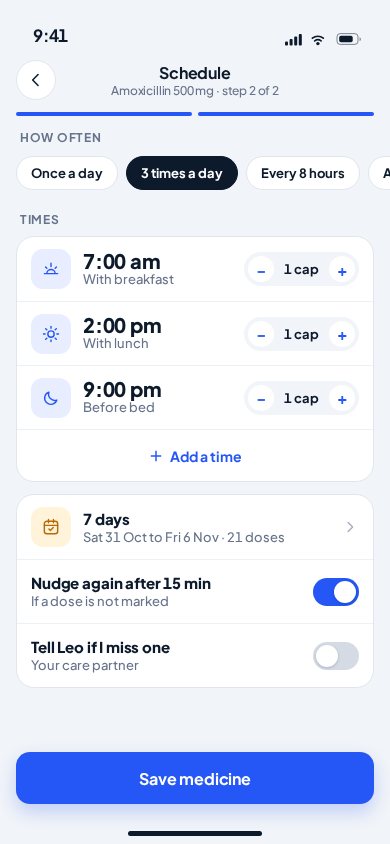
Pillbox is a complete pharmacy and medicine app: welcome, sign in and a text code, a today timeline of doses to take or skip, a dose sheet, a weekly pillbox grid, a medicine cabinet, a medicine page with its label and supply, adding a medicine by scanning the label, a dose schedule, an interaction check, refills ready to order, pickup or delivery, choosing a store on a map, order review, a placed order, live delivery tracking, a pickup code, a chat with the pharmacist, an adherence report, notifications, a Plus plan, a family profile and settings. Cool grey and white with cobalt, amber and a calm green for taken.
| Detail | Value |
|---|---|
| Screen type | Form |
| App | Pillbox: Pharmacy refills and medicine reminders |
| Category | Health and fitness |
| Design language | Clinical, light |
| Type | Plus Jakarta Sans |
| Colours | #f1f4f8 background, #ffffff surface, #0c1a2b text, #66738a text-muted, #2457f5 accent, #ffffff accent-contrast, #f2a516 secondary, #e1e6ee border, #e5484d danger |
What this screen says
- ScheduleAmoxicillin 500 mg · step 2 of 2
- How often
- Once a day 3 times a day Every 8 hours As needed
- Times
- 7:00 am
- With breakfast
- −1 cap+
- 2:00 pm
- With lunch
- 9:00 pm
- Before bed
- Add a time
- 7 days
- Sat 31 Oct to Fri 6 Nov · 21 doses
- Nudge again after 15 min
- If a dose is not marked
- Tell Leo if I miss one
- Your care partner
- Save medicine
Around it in Pillbox
More form and input screens
- Vita Log a reading: Personal health record
- Lull Sleep timer: Sleep sounds and meditation
- Flexpass Filters: One membership, many studios
- Clinic Filters: Find and book doctors
- Careline New task: Care for an ageing parent
- Velo Your goals: Live and on-demand indoor cycling
- Vantage Edit my day: Sports watch companion
- Labwork Collection: Book blood tests and see results
- Segment Save activity: Runs and rides with friends
- Nightly Add tags: Smart ring sleep and readiness
- Rise Set alarm: Alarm clock and sleep cycles
- Ward Check in: Patient portal for results, visits and messages
What makes a good form screen
- Ask only what you need. Every field is a reason to stop. Remove optional fields or move them to later.
- Labels above fields. Visible labels stay readable while people type; placeholder-only labels disappear.
- Use the right keyboard and input. Number pads for amounts, email keyboards for email, pickers for dates and autofill for addresses and codes.
- Validate as people go. Show problems next to the field when people leave it, in words that say how to fix them.
The full form screen guide and every example
Remix Pillbox free: describe your own app and it is drawn in this design. Or get its files from $10: Figma, React Native, SwiftUI, Flutter and HTML.