Templates · Paywall screens · Fitness app · Pillbox
Pillbox Plus screen
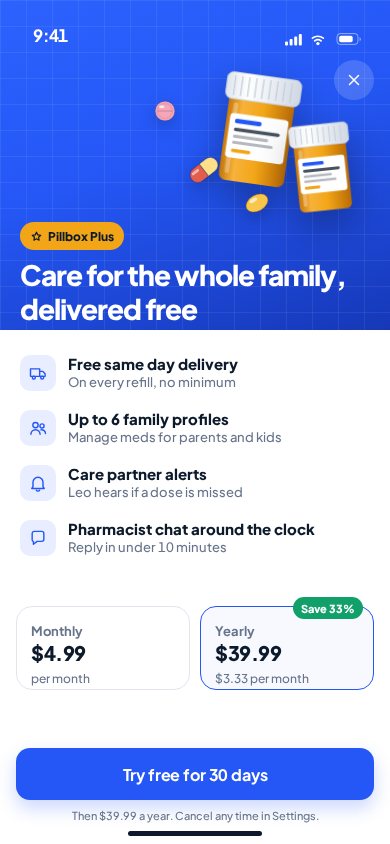
A paywall screen from Pillbox, a pharmacy refills and medicine reminders app template in a Clinical style. Screen 23 of 25.
Pillbox is a complete pharmacy and medicine app: welcome, sign in and a text code, a today timeline of doses to take or skip, a dose sheet, a weekly pillbox grid, a medicine cabinet, a medicine page with its label and supply, adding a medicine by scanning the label, a dose schedule, an interaction check, refills ready to order, pickup or delivery, choosing a store on a map, order review, a placed order, live delivery tracking, a pickup code, a chat with the pharmacist, an adherence report, notifications, a Plus plan, a family profile and settings. Cool grey and white with cobalt, amber and a calm green for taken.
| Detail | Value |
|---|---|
| Screen type | Paywall |
| App | Pillbox: Pharmacy refills and medicine reminders |
| Category | Health and fitness |
| Design language | Clinical, light |
| Type | Plus Jakarta Sans |
| Colours | #f1f4f8 background, #ffffff surface, #0c1a2b text, #66738a text-muted, #2457f5 accent, #ffffff accent-contrast, #f2a516 secondary, #e1e6ee border, #e5484d danger |
What this screen says
- Pillbox Plus
- Care for the whole family, delivered free
- Free same day deliveryOn every refill, no minimum
- Up to 6 family profilesManage meds for parents and kids
- Care partner alertsLeo hears if a dose is missed
- Pharmacist chat around the clockReply in under 10 minutes
- Monthly
- per month
- Save 33%Yearly
- $3.33 per month
- Try free for 30 days
- Then $39.99 a year. Cancel any time in Settings.
Around it in Pillbox
More paywall screens
- Bump Plus: Pregnancy week by week
- Locker Membership: Gym membership and class booking
- Morsel Pro: AI calorie tracker
- Dew Plus: AI skin scan and routine
- Cradle Plus: Baby tracker
- Donor Circle: Blood donation, counted drop by drop
- Unfold Plus: Yoga and stretching
- Kilo Pro: Strength training log
- Cyra Plus: Cycle tracker
- Harbor Plus: Therapy and mood
- Fasten Plus: Intermittent fasting
- Plate Plus: Calorie and macro tracker
Every fitness app paywall screen
What makes a good paywall screen
- Lead with the outcome, not the feature list. The headline should say what changes for the person: "Train smarter every week" beats "Unlock Premium". Three to five benefits underneath are enough; more turns into a wall of ticks nobody reads.
- Show the real price, period and trial terms. State the price, how often it renews and when a free trial turns into a charge, near the button. Apple's App Store guideline 3.1.2 asks subscription apps to make this clear before purchase, and Google Play has similar rules.
- One primary button. The main call to action should be impossible to miss and say what happens: "Start 7-day free trial" or "Subscribe for $4.99/month". A second plan choice is fine; a second competing button is not.
- Make the plans easy to compare. When you offer monthly and yearly, show both prices in the same unit (per month or per week) and mark the saving on the yearly plan in plain numbers, not just a badge.
The full paywall screen guide and every example
Remix Pillbox free: describe your own app and it is drawn in this design. Or get its files from $10: Figma, React Native, SwiftUI, Flutter and HTML.