Templates · List and feed screens · Education app · Penpal
Penpal Notifications screen
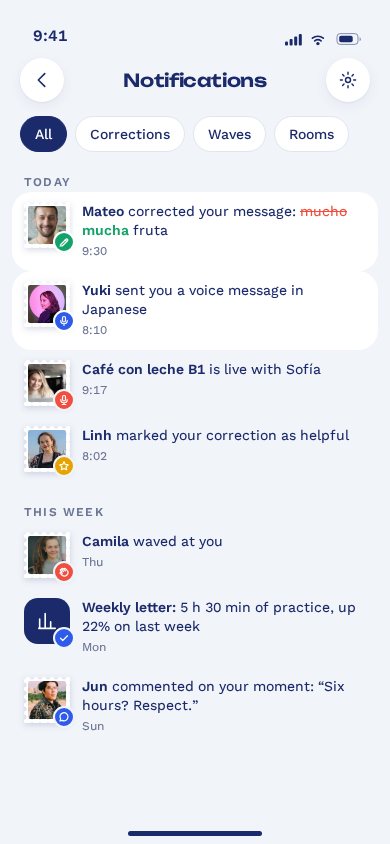
A list screen from Penpal, a language exchange chat app template in a Playful style. Screen 23 of 25.
Penpal is a complete language exchange app: welcome, your native and learning languages, sign up, a partners home matched by language, search with filters, a partner profile, chats, a conversation with inline corrections and translations, a correction editor, a translation sheet, voice messages, a call with topic cards, a moments feed with a post, comments and a composer, live voice rooms, progress stats, a saved phrase notebook, a Plus plan with checkout and confirmation, notifications, profile and settings. Airmail paper, postal navy, airmail red and blue.
| Detail | Value |
|---|---|
| Screen type | List |
| App | Penpal: Language exchange chat |
| Category | Education |
| Design language | Playful, light |
| Type | Unbounded for headings, Work Sans for text |
| Colours | #f1f4f9 background, #ffffff surface, #1b2a6b text, #6b7493 text-muted, #f04e3e accent, #ffffff accent-contrast, #2f5bea secondary, #e0e5ef border, #14a26b success, #ffcf4a highlight |
What this screen says
- Notifications
- All Corrections Waves Rooms
- TODAY
- Mateo corrected your message: mucho mucha fruta
- Yuki sent you a voice message in Japanese
- Café con leche B1 is live with Sofía
- Linh marked your correction as helpful
- THIS WEEK
- Camila waved at you
- Thu
- Weekly letter: 5 h 30 min of practice, up 22% on last week
- Mon
- Jun commented on your moment: “Six hours? Respect.”
- Sun
Around it in Penpal
More list and feed screens
- Syntax Notifications: Learn to code
- Tuckin Notifications: Bedtime stories for kids
- Zenith Planets: Night sky guide
- Chalk Category: Design courses
- Encore Notifications: Creator courses
- Classroom Classwork: Class stream and assignments
- Studyhall Assigned: Free lessons and practice for school
- Tutor Reviews: Book online tutors for any skill
- Leaf Library: E-books and reading
- Almanac Contents: The free encyclopedia reader
- Tiles Archive: Daily word and number puzzles
- Stacks Loans: Borrow e-books and audiobooks from your library
Every education app list screen
What makes a good list screen
- Show what people need to decide. Each row should carry just enough to choose: a title, one or two details and a status. Everything else belongs on the detail screen.
- Keep rows consistent. The same information in the same place on every row lets people scan down a column instead of reading each item.
- Group with headings. Dates, categories or status headings break long lists into chunks people can skip through.
- Make common actions quick. Swipe actions, a checkbox or a heart on the row save opening the item for small tasks.
The full list screen guide and every example
Remix Penpal free: describe your own app and it is drawn in this design. Or get its files from $10: Figma, React Native, SwiftUI, Flutter and HTML.