Templates · Onboarding screens · Finance app · Payday
Payday Welcome screen
An onboarding screen from Payday, a payroll for small teams app template in an Enterprise style. Screen 1 of 25.
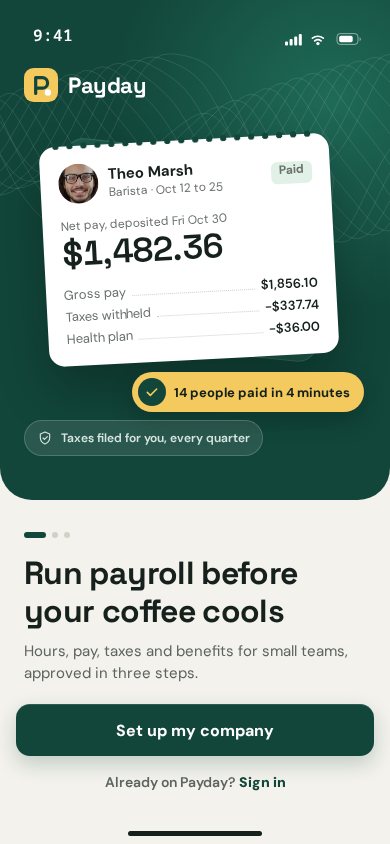
Payday is a complete payroll app for a small team: welcome, sign in and a code check, a company home with the next pay run, entering hours, a review with a cost breakdown, a slide to submit approval and a submitted timeline, pay run history and detail, a perforated pay stub, the team list, an employee record, adding an employee or contractor, time off requests with an approval view, benefits and a retirement plan, tax filings and a filed return, cost reports, plans, notifications, the company profile and settings. Warm paper and white with deep spruce, gold and cheque guilloche lines.
| Detail | Value |
|---|---|
| Screen type | Onboarding |
| App | Payday: Payroll for small teams |
| Category | Finance |
| Design language | Enterprise, light |
| Type | Space Grotesk for headings, DM Sans for text |
| Colours | #f3f2ec background, #ffffff surface, #16201c text, #6a716c text-muted, #12463a accent, #ffffff accent-contrast, #f4c95d secondary, #e4e2d9 border, #c8442f danger |
What this screen says
- Payday
- Theo Marsh
- Barista · Oct 12 to 25
- Paid
- Net pay, deposited Fri Oct 30$1,482.36
- Gross pay $1,856.10
- Taxes withheld −$337.74
- Health plan −$36.00
- 14 people paid in 4 minutes
- Taxes filed for you, every quarter
- Run payroll before your coffee cools
- Hours, pay, taxes and benefits for small teams, approved in three steps.
- Set up my company
- Already on Payday?Sign in
Around it in Payday
More onboarding screens
- Levy Welcome: Taxes for freelancers
- Bullion Welcome: Gold and silver savings
- Wage Welcome: Get paid as you work
- Keystone Welcome: Mortgage and home loan tracker
- Rebate Welcome: Cashback card and rewards
- Aegis Welcome: Insurance policies and claims
- Till Welcome: Card reader and sales for small shops
- Strike Welcome: Options trading
- Prism Welcome: Net worth across every account
- Folio Welcome: Stocks and ETF investing
- Compound Welcome: Mutual funds and SIPs
- Halden Welcome: Premium neobank
Every finance app onboarding screen
What makes a good onboarding screen
- One idea per screen. Each screen should say one thing in a headline people can read in a second. If a screen needs a paragraph, it is doing too much.
- Personalise with a purpose. Ask a question only if the answer changes what people see next, like a goal, a level or an interest. Then show that the answer mattered.
- Explain permissions before asking. Show your own screen saying why you need notifications, location or the camera before the system prompt. People who understand the reason are more likely to allow it.
- Let people skip. A visible skip or "I'll do this later" respects returning users and the impatient. Make sure skipping still lands them somewhere useful.
The full onboarding screen guide and every example
Remix Payday free: describe your own app and it is drawn in this design. Or get its files from $10: Figma, React Native, SwiftUI, Flutter and HTML.