Templates · List and feed screens · Productivity app · Parchment
Parchment Version history screen
A list screen from Parchment, a productivity app template in a Minimal style. Screen 17 of 25.
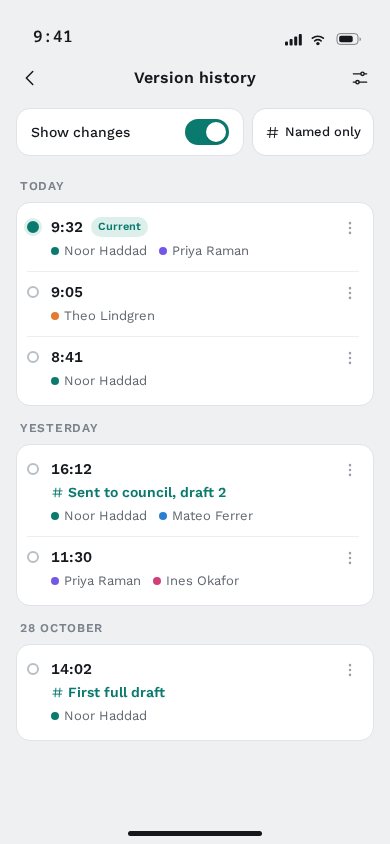
Parchment is a complete documents app: welcome, sign in, a home with new document starters and a grid of recent pages, search, files and shared with me, a document page, live editing with a formatting bar and keyboard, text style, suggestion mode with tracked changes, comments and a reply thread, the outline, share with roles, link access and an invite sent screen, version history and an old version to restore, templates, document activity, offline files, notifications, a Pro plan, profile and settings. Fog grey and paper white with ink, verdigris and a highlighter yellow.
| Detail | Value |
|---|---|
| Screen type | List |
| App | Parchment: Documents, edit and share |
| Category | Productivity |
| Design language | Minimal, light |
| Type | Iowan Old Style for headings, Work Sans for text |
| Colours | #eef0f2 background, #ffffff surface, #14171c text, #687079 text-muted, #0b7a6e accent, #ffffff accent-contrast, #ffe27a secondary, #e0e3e7 border, #c23b4a danger |
What this screen says
- Version history
- Show changes
- Named only
- Today
- 9:32Current
- Noor Haddad Priya Raman
- Theo Lindgren
- Noor Haddad
- Yesterday
- Sent to council, draft 2
- Noor Haddad Mateo Ferrer
- Priya Raman Ines Okafor
- 28 October
- First full draft
Around it in Parchment
More list and feed screens
- Rota Notifications: Shift scheduling for hourly teams
- Inkwell Prompts: Daily journal
- Shortlist Notifications: Job search and application tracker
- Parley Add members: Team messenger
- Docket Notifications: Task and sprint planner
- Kanso Notifications: Tasks, calendar and chat
- Margin Notebooks: AI note taking
- Aide Notifications: Executive AI assistant
- Juno Models: AI chat assistant
- Opal Projects: Studio dashboard
- Jot Folders: Quick notes and checklists
- Chrono Alarms: World clock, timers and stopwatch
Every productivity app list screen
What makes a good list screen
- Show what people need to decide. Each row should carry just enough to choose: a title, one or two details and a status. Everything else belongs on the detail screen.
- Keep rows consistent. The same information in the same place on every row lets people scan down a column instead of reading each item.
- Group with headings. Dates, categories or status headings break long lists into chunks people can skip through.
- Make common actions quick. Swipe actions, a checkbox or a heart on the row save opening the item for small tasks.
The full list screen guide and every example
Remix Parchment free: describe your own app and it is drawn in this design. Or get its files from $10: Figma, React Native, SwiftUI, Flutter and HTML.