Templates · Form and input screens · Productivity app · Parchment
Parchment Link access screen
A form screen from Parchment, a productivity app template in a Minimal style. Screen 15 of 25.
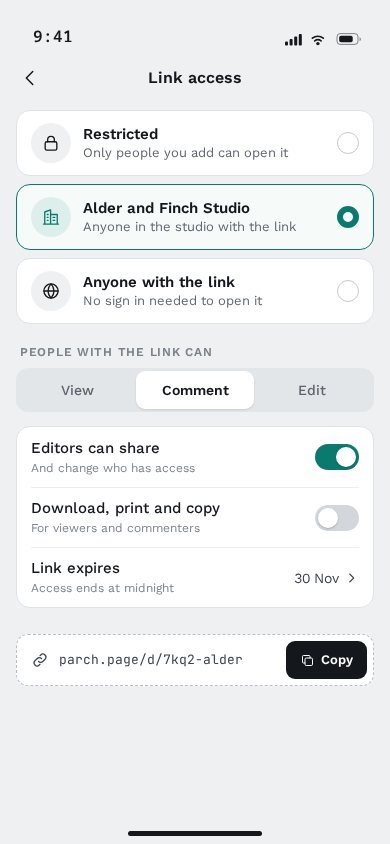
Parchment is a complete documents app: welcome, sign in, a home with new document starters and a grid of recent pages, search, files and shared with me, a document page, live editing with a formatting bar and keyboard, text style, suggestion mode with tracked changes, comments and a reply thread, the outline, share with roles, link access and an invite sent screen, version history and an old version to restore, templates, document activity, offline files, notifications, a Pro plan, profile and settings. Fog grey and paper white with ink, verdigris and a highlighter yellow.
| Detail | Value |
|---|---|
| Screen type | Form |
| App | Parchment: Documents, edit and share |
| Category | Productivity |
| Design language | Minimal, light |
| Type | Iowan Old Style for headings, Work Sans for text |
| Colours | #eef0f2 background, #ffffff surface, #14171c text, #687079 text-muted, #0b7a6e accent, #ffffff accent-contrast, #ffe27a secondary, #e0e3e7 border, #c23b4a danger |
What this screen says
- Link access
- Restricted
- Only people you add can open it
- Alder and Finch Studio
- Anyone in the studio with the link
- Anyone with the link
- No sign in needed to open it
- People with the link can
- View Comment Edit
- Editors can share
- And change who has access
- Download, print and copy
- For viewers and commenters
- Link expires
- Access ends at midnight
- 30 Nov
- parch.page/d/7kq2-alder Copy
Around it in Parchment
More form and input screens
- Unplug Choose apps: Screen time blocker
- Deskly Book a desk: Hybrid office booking
- Pomo New session: Focus timer
- Postbox Compose: Email for busy teams
- Daybook New event: Calendar and planner
- Scanly Sign: Document scanner
- Keyring New item: Password manager
- Rota Swap shift: Shift scheduling for hourly teams
- Inkwell Write: Daily journal
- Shortlist Filters: Job search and application tracker
- Parley Create group: Team messenger
- Docket New task: Task and sprint planner
Every productivity app form screen
What makes a good form screen
- Ask only what you need. Every field is a reason to stop. Remove optional fields or move them to later.
- Labels above fields. Visible labels stay readable while people type; placeholder-only labels disappear.
- Use the right keyboard and input. Number pads for amounts, email keyboards for email, pickers for dates and autofill for addresses and codes.
- Validate as people go. Show problems next to the field when people leave it, in words that say how to fix them.
The full form screen guide and every example
Remix Parchment free: describe your own app and it is drawn in this design. Or get its files from $10: Figma, React Native, SwiftUI, Flutter and HTML.