Templates · Settings screens · Food app · Omakase
Omakase Settings screen
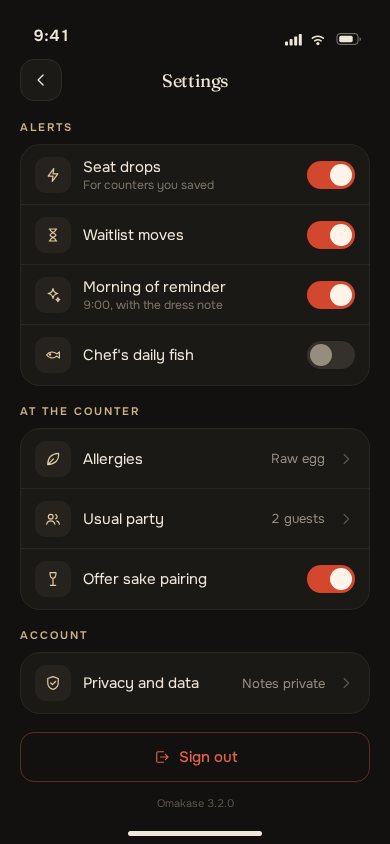
A settings screen from Omakase, a chef's counter reservations app template in a Luxury style. Screen 25 of 25.
Omakase is a complete chef's counter booking app: welcome, your palate and allergies, sign in, a home with your next seat and the next seat drop, discover, a counter page, the chef, tonight's courses, a seat picker on a drawn hinoki counter, date and seating, guests and notes, review and pay, a sealed confirmation, reservations, a reservation ticket, waitlist alerts, a live course tracker at the counter, a tasting journal and notes, a passport of seals and stats, saved counters, a Reserve membership, notifications, profile and settings. Sumi ink and hinoki wood with one vermilion accent.
| Detail | Value |
|---|---|
| Screen type | Settings |
| App | Omakase: Chef's counter reservations |
| Category | Food |
| Design language | Luxury, dark |
| Type | Fraunces for headings, Onest for text |
| Colours | #12110f background, #1b1916 surface, #efe7d8 text, #968d7f text-muted, #d4472f accent, #fff4ea accent-contrast, #e2cba3 secondary, #2a2722 border, #e0604a danger |
What this screen says
- Settings
- Alerts
- Seat drops
- For counters you saved
- Waitlist moves
- Morning of reminder
- 9:00, with the dress note
- Chef's daily fish
- At the counter
- Allergies
- Raw egg
- Usual party
- 2 guests
- Offer sake pairing
- Account
- Privacy and data
- Notes private
- Sign out
- Omakase 3.2.0
Around it in Omakase
More settings screens
- Rescue Settings: Surprise bags of surplus food
- Lunchbox Settings: School lunch planner for parents
- Agave Settings: Cocktails and home bar
- Crock Settings: Fermentation and sourdough starter log
- Curbside Settings: Street food and food truck finder
- Forage Settings: Farmers market and veg box
- Ember Settings: Smoker and grill thermometer
- Steep Settings: Tea brewing and tasting notes
- Brigade Settings: Restaurant kitchen and line ops
- Nibs Settings: Food allergy and label scanner
- Ladle Settings: Recipes and meal planning
- Pantry Settings: Grocery delivery
Every food app settings screen
What makes a good settings screen
- Group options into clear sections. Account, notifications, privacy, appearance and help, with headings, so people scan to the right group.
- Label settings by their effect. "Daily reminder at 8:00" is clearer than "Reminders". Add a short description under options that need one.
- Use the right control. Toggles for on and off, a row that opens a list for choices, and sliders only for ranges.
- Apply changes immediately. Most mobile settings take effect when changed, with no Save button to forget.
The full settings screen guide and every example
Remix Omakase free: describe your own app and it is drawn in this design. Or get its files from $10: Figma, React Native, SwiftUI, Flutter and HTML.