Templates · Success and confirmation screens · Sports app · Ollie
Ollie Booked screen
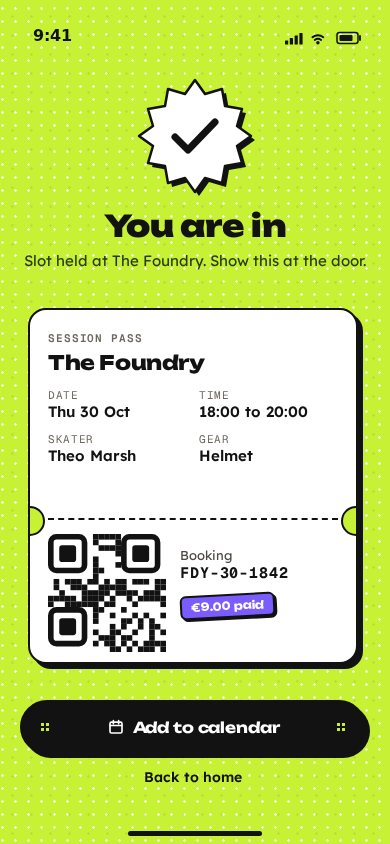
A success screen from Ollie, a skate spots and clips app template in a Neubrutalism style. Screen 21 of 25.
Ollie is a complete skate app: welcome and stance setup, sign in, a home with skate weather and nearby spots, a sticker pin spot map, search with bust factor, spot pages, adding a spot, a crew clip feed, a slow-mo clip player with trick tags on the timeline, a camera with line mode, posting a trimmed clip, a trick list and trick page, a live session tracker, stats, a game of S.K.A.T.E., skateparks with crowd charts, booking a park session and its pass, notifications, Ollie Pro, profile with a sticker wall and settings. Concrete, black grip tape, acid lime and violet.
| Detail | Value |
|---|---|
| Screen type | Success |
| App | Ollie: Skate spots and clips |
| Category | Sports |
| Design language | Neubrutalism, light |
| Type | Lexend |
| Colours | #eeebe3 background, #ffffff surface, #121212 text, #6b675e text-muted, #c6f135 accent, #121212 accent-contrast, #7b5cff secondary, #121212 border, #ff4a3d danger |
What this screen says
- You are in
- Slot held at The Foundry. Show this at the door.
- Session pass
- The Foundry
- DateThu 30 Oct
- Time18:00 to 20:00
- SkaterTheo Marsh
- GearHelmet
- BookingFDY-30-1842€9.00 paid
- Add to calendar
- Back to home
Around it in Ollie
More success and confirmation screens
- Piste Pass ready: Ski resort companion
- Crag Sent: Climbing gym logbook
- Fairway Booked: Golf course guide and scorecard
- Matchday Transfers made: Football scores and fantasy
- Rally Court booked: Tennis and padel club
- Swell Session saved: Surf forecast
- Elevens Joined: Fantasy cricket leagues
- Scoreboard Subscribed: Scores and news for every sport
- Bib Entered: Find and enter races
- Wicket Booked: Live cricket scores
- Courtside Locked in: Pickup basketball games
- Tack Entered: Sailing wind and regatta tracker
Every sports app success screen
What makes a good confirmation screen
- Confirm in the headline. "Payment sent", "Table booked for Friday at 8" or "Lesson complete" in plain words, with a clear success colour or icon.
- Repeat the key details. Amount, date, reference number or score, so people do not need to check elsewhere that the right thing happened.
- Say what happens next. When the order arrives, when the money lands, when the next lesson unlocks.
- Offer the next step. Track the order, add to calendar, share, or start the next lesson. One primary action and a way back home.
The full confirmation screen guide and every example
Remix Ollie free: describe your own app and it is drawn in this design. Or get its files from $10: Figma, React Native, SwiftUI, Flutter and HTML.