Templates · Success and confirmation screens · Sports app · Elevens
Elevens Joined screen
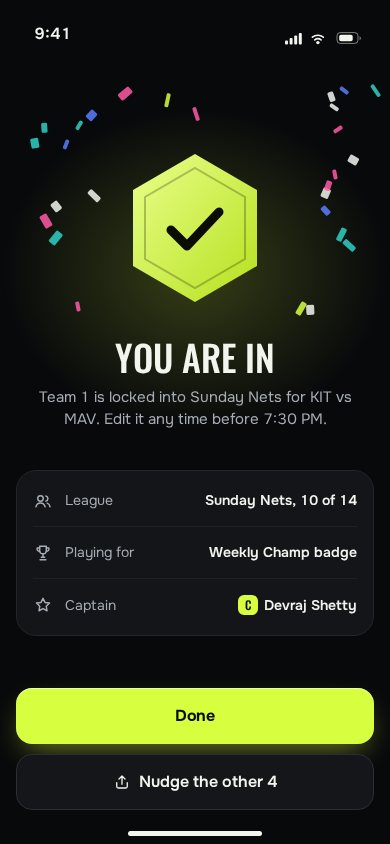
A success screen from Elevens, a fantasy cricket leagues app template in a Dark-first style. Screen 13 of 25.
Elevens is a complete free to play fantasy cricket app: welcome, how it works, sign in, a matchday home, fixtures, a match centre, building an eleven within 100 credits, a player card, picking captain and vice captain, a team preview on the field, your teams, joining a league with a review and a joined screen, private leagues, a league page and a new league form, live points, a live leaderboard, season stats, badges, player search, notifications, a Plus plan, profile and settings. Near black with volt lime and team colours.
| Detail | Value |
|---|---|
| Screen type | Success |
| App | Elevens: Fantasy cricket leagues |
| Category | Sports |
| Design language | Dark-first, dark |
| Type | Oswald for headings, Onest for text |
| Colours | #08090b background, #131518 surface, #f2f4ee text, #8a909a text-muted, #d7ff3f accent, #0b0d05 accent-contrast, #2fd0c4 secondary, #22252b border, #ff5d6c danger |
What this screen says
- You are in
- Team 1 is locked into Sunday Nets for KIT vs MAV. Edit it any time before 7:30 PM.
- LeagueSunday Nets, 10 of 14
- Playing forWeekly Champ badge
- CaptainC Devraj Shetty
- Done
- Nudge the other 4
Around it in Elevens
More success and confirmation screens
- Scoreboard Subscribed: Scores and news for every sport
- Bib Entered: Find and enter races
- Wicket Booked: Live cricket scores
- Courtside Locked in: Pickup basketball games
- Tack Entered: Sailing wind and regatta tracker
- Frag Registered: Esports tournaments and teams
- Canter Booked: Riding stables and lessons
- Ollie Booked: Skate spots and clips
- Eddy Shuttle booked: River levels for paddlers
- Whistle Full time: Grassroots league manager for coaches
- Oche Leg won: Darts scorer and leagues
- Cairn Hike summary: Trails, contours and summits on one map sheet
Every sports app success screen
What makes a good confirmation screen
- Confirm in the headline. "Payment sent", "Table booked for Friday at 8" or "Lesson complete" in plain words, with a clear success colour or icon.
- Repeat the key details. Amount, date, reference number or score, so people do not need to check elsewhere that the right thing happened.
- Say what happens next. When the order arrives, when the money lands, when the next lesson unlocks.
- Offer the next step. Track the order, add to calendar, share, or start the next lesson. One primary action and a way back home.
The full confirmation screen guide and every example
Remix Elevens free: describe your own app and it is drawn in this design. Or get its files from $10: Figma, React Native, SwiftUI, Flutter and HTML.